In enterprise engineering, deploying high-throughput, low-latency infrastructure on multi-socket bare-metal servers (such as dual-socket Intel Xeon Platinum or AMD EPYC systems) often reveals a baffling performance anomaly: while average (p50) latency looks pristine, 99th and 99.9th percentile (p99/p999) tail latency spikes violently into the hundreds of milliseconds. Database queries stall, high-frequency trading execution queues drop packets, and Kafka distributed brokers experience random throughput collapse.
When systems architects investigate these latency anomalies, the culprit is almost never slow disks or network congestion. It is the insidious hardware reality of Non-Uniform Memory Access (NUMA) and unpinned Linux thread migration.
In a modern multi-socket server, accessing RAM attached to a remote CPU socket across an interconnect bus (Intel UPI or AMD Infinity Fabric) takes 2.2× longer and delivers less than half the bandwidth of accessing local memory. When the Linux kernel’s Completely Fair Scheduler (CFS) or new Earliest Eligible Virtual Deadline First (EEVDF) scheduler dynamically balances workloads across sockets, it flushes warm CPU caches, triggers TLB shootdown Inter-Processor Interrupts (IPIs), and saturates cross-socket interconnects. Here is an exhaustive engineering manual on NUMA hardware physics, the cost of thread hops, and how to master CPU pinning, NUMA node binding, and CPU shielding for sub-millisecond p99 latency.
1. NUMA Hardware Topologies: Local DDR5 vs. Cross-Socket UPI Interconnects
In simple single-socket desktop computers, the memory architecture is Uniform Memory Access (UMA): all CPU cores connect to a single unified memory controller, and memory access latency is strictly identical regardless of which core executes an instruction.
In high-core-count enterprise servers, however, physical routing limitations prevent 128 cores from sharing a single centralized memory bus. Instead, hardware architects partition the system into discrete NUMA Nodes. Each CPU socket contains its own physical memory controllers, its own dedicated multi-channel DDR5 memory slots, and its own multi-megabyte L3 cache slice.
The sockets communicate with each other over point-to-point coherent interconnect links: Ultra Path Interconnect (UPI) on Intel platforms or Infinity Fabric (IF) on AMD platforms.
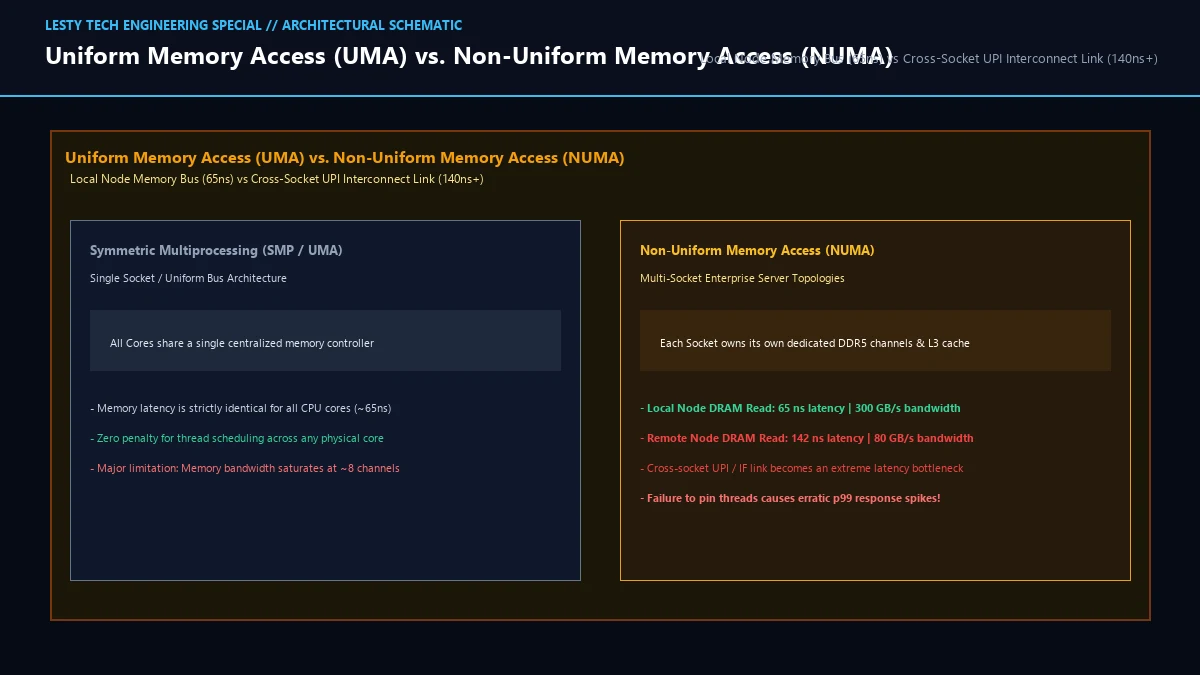
This creates an immense microarchitectural latency disparity:
- Local Node Memory Access: When Core 4 on Socket 0 reads memory allocated in Socket 0’s local DDR5 channels, the request traverses the on-die ring/mesh interconnect directly to the local memory controller. Round-trip read latency is approximately 60 to 65 nanoseconds, with memory bandwidth reaching 300+ GB/s.
- Remote Node Memory Access: When Core 4 on Socket 0 attempts to read memory residing on Socket 1, the request must traverse: (1) the Socket 0 internal mesh bus, (2) the cross-socket UPI physical interconnect layer (SerDes transceivers, cable/socket routing, packetization protocols), (3) the Socket 1 internal mesh bus, and (4) the Socket 1 memory controller. Round-trip read latency explodes to 135 to 155 nanoseconds—a 230% latency penalty!
- Interconnect Contention: A modern dual-socket server has 3 or 4 UPI links providing an aggregate cross-socket bandwidth of roughly 96 to 128 GB/s. While this sounds large, it is a fraction of the aggregate local DDR5 memory bandwidth (which exceeds 600 GB/s across both sockets). If unpinned threads continuously fetch remote data, the UPI links saturate instantly, creating massive packet queueing delays.
2. The Linux EEVDF Scheduler and the Anatomy of Thread Migration
The Linux kernel’s process scheduler (historically CFS, and starting in Linux 6.6, the EEVDF scheduler) is fundamentally designed to maximize system-wide fairness and aggregate hardware utilization.
To prevent one CPU socket from sitting at 100% utilization while the second socket idles, the scheduler executes periodic load balancing passes across scheduling domains:
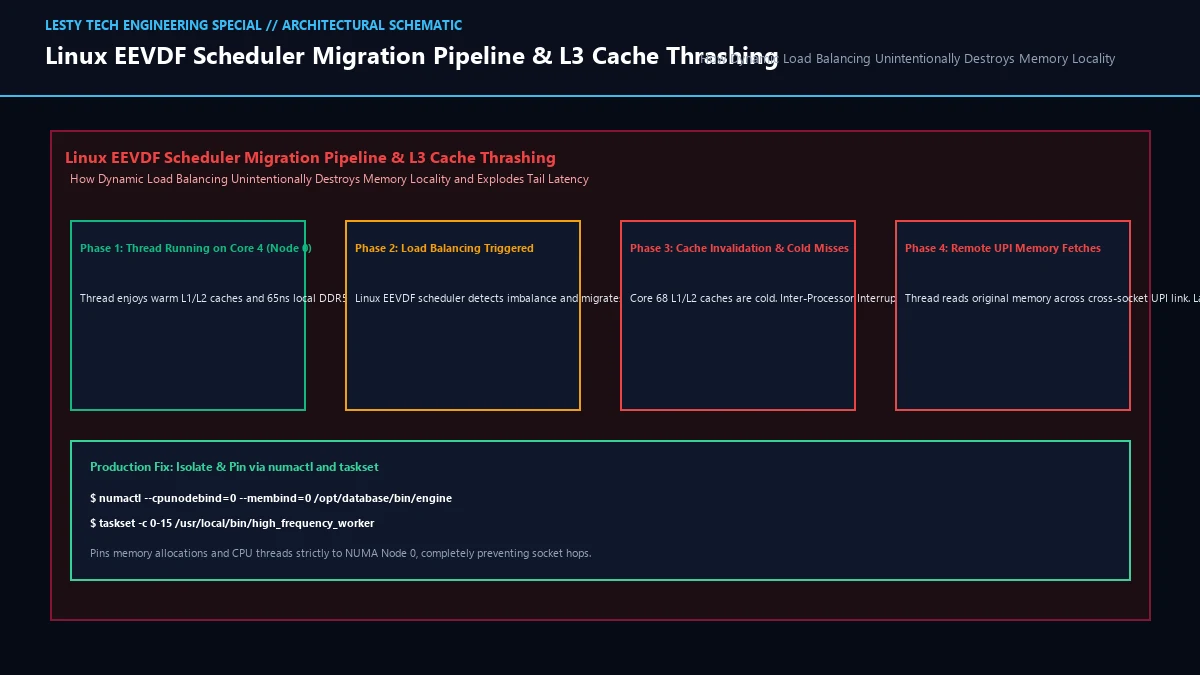
While dynamic load balancing is ideal for batch compilation or video rendering, it is catastrophic for latency-critical stateful engines (Redis, PostgreSQL, Cassandra, ClickHouse, Java JVMs):
- Cache Invalidation and Cold Misses: A database worker thread running on Socket 0 populates Core 4’s 48 KB L1 data cache and 2 MB L2 cache with high-frequency indexes and hash tables. When the EEVDF scheduler decides Socket 1 has spare capacity and migrates the thread to Core 68 on Socket 1, Core 68’s caches are completely empty (cold). The thread immediately stalls on hundreds of consecutive L1/L2 cache misses.
- Remote Memory Pinning Trap: When a Linux process allocates memory via
malloc()ormmap(), the kernel defaults to the First-Touch NUMA Policy: memory pages are physically allocated on the NUMA node of the CPU core that first writes to the page. If the thread allocated 32 GB of memory while running on Socket 0, that memory remains physically anchored to Socket 0’s DDR5 slots! Even after the thread is migrated to Socket 1, all future memory operations must traverse the slow, saturated UPI interconnect. - TLB Shootdowns and Inter-Processor Interrupts (IPIs): When thread contexts move or memory mappings change across sockets, the kernel must guarantee memory coherence by invalidating Translation Lookaside Buffer (TLB) entries across all participating cores. This triggers hardware TLB Shootdown IPIs: the originating core halts remote CPU cores via hardware interrupts, forcing them to flush their TLBs. A high rate of thread migration can consume 10% to 20% of total server CPU cycles purely servicing IPI interrupts!
3. Production Hardening: taskset, numactl, and CPU Shielding
To eliminate tail latency spikes in enterprise production, systems engineers must enforce hard affinity and memory isolation, stripping the Linux scheduler of its power to migrate latency-critical threads.
Step 1: Inspecting NUMA Topology with numactl and lscpu
Before applying affinity rules, inspect the exact physical topology of your server:
$ numactl –hardware
available: 2 nodes (0-1)
node 0 cpus: 0 1 2 3 4 5 6 7 8 9 10 11 12 13 14 15
node 0 size: 257698 MB
node 1 cpus: 16 17 18 19 20 21 22 23 24 25 26 27 28 29 30 31
node 1 size: 258048 MB
node distances:
node 0 1
0: 10 21 # Distance 10 = local (1.0x); Distance 21 = remote (2.1x latency)
1: 21 10
Step 2: Enforcing Process Binding via numactl
Launch latency-sensitive services pinned strictly to a single NUMA node. The --cpunodebind flag locks execution to the socket’s physical cores, while --membind forces all memory allocations to occur exclusively on that node’s local DDR5 channels:
$ numactl –cpunodebind=0 –membind=0 /usr/bin/redis-server /etc/redis/node0.conf
# Pin Redis instance #2 strictly to NUMA Node 1
$ numactl –cpunodebind=1 –membind=1 /usr/bin/redis-server /etc/redis/node1.conf
Step 3: Programmatic Thread Pinning with pthread_setaffinity_np
In multi-threaded C/C++ or Rust applications, assign specific worker threads to dedicated physical cores at runtime:
#include <pthread.h>
void pin_thread_to_core(int core_id) {
cpu_set_t cpuset;
CPU_ZERO(&cpuset);
CPU_SET(core_id, &cpuset);
pthread_t current_thread = pthread_self();
pthread_setaffinity_np(current_thread, sizeof(cpu_set_t), &cpuset);
}
Step 4: Extreme Latency Hardening via Kernel Boot Shielding (isolcpus)
For ultra-low-latency financial trading or telecommunications (NFV), even soft pinning is insufficient because kernel background worker threads, RCU callbacks, and hardware interrupts can still preempt your worker thread.
Shield cores completely at boot time by editing GRUB kernel parameters in /etc/default/grub:
This configuration transforms specified cores into shielded execution chambers:
isolcpus: Strips cores 4-15 and 20-31 from the Linux scheduler. No user or kernel thread will ever be scheduled on these cores unless explicitly assigned viataskset.nohz_full: Eliminates the periodic timer tick interrupt when a single process runs on the core (tickless kernel), preventing microsecond-level preemption jitters.rcu_nocbs: Offloads Read-Copy-Update (RCU) garbage collection callbacks to unshielded housekeeping cores (cores 0-3).
Step 5: Container and Kubernetes NUMA Hardening (CPUManager Static Policy)
In cloud-native Kubernetes environments, deploying containers with default CPU limits (e.g., resources.limits.cpu: "8") relies on Linux Completely Fair Scheduler (CFS) bandwidth quotas (cpu.cfs_quota_us). The scheduler dynamically distributes the container’s threads across any arbitrary cores on either NUMA socket. Under high concurrency, threads bounce continuously across socket boundaries, causing severe p99 response spikes.
To achieve deterministic microsecond latencies, enterprise Kubernetes clusters must enable the Static CPU Manager Policy on kubelet nodes (--cpu-manager-policy=static) combined with the Topology Manager (--topology-manager-policy=single-numa-node). When a pod requests integer core limits in the Guaranteed QoS tier, the kubelet assigns dedicated, exclusive physical CPU cores and allocates container memory strictly within a single NUMA node, completely preventing socket hops and cache evictions.
4. Kernel Memory Subsystem Tuning: vm.zone_reclaim_mode and CXL Memory Tiering
Beyond thread affinity, kernel memory subsystem parameters dictate how Linux handles NUMA memory pressure:
- Disabling Zone Reclaim (
vm.zone_reclaim_mode = 0): By default, if a NUMA node runs out of memory, aggressive zone reclaim forces the kernel to synchronously scan and flush dirty file-backed pages to satisfy allocations locally. This synchronous disk flushing freezes the application for tens of milliseconds. Settingvm.zone_reclaim_mode = 0tells the kernel to allocate from adjacent NUMA nodes gracefully instead of pausing to reclaim. - Disabling Automatic NUMA Balancing (
kernel.numa_balancing = 0): Linux incorporates an automatic NUMA balancing engine that deliberately unmaps pages to trigger page faults, sampling where memory accesses originate and migrating memory pages across sockets. While well-intentioned, this sampling induces continuous minor page faults and high interconnect bandwidth overhead. In pinned enterprise environments, disable it permanently viasysctl -w kernel.numa_balancing=0. - CXL 2.0/3.0 Type 3 Memory Expansion: Emerging PCIe Gen 5 servers introduce Compute Express Link (CXL) attached memory. The Linux kernel treats CXL pools as disaggregated, CPU-less NUMA nodes (e.g., Node 2 and Node 3). Accessing CXL memory incurs ~180ns to 220ns latency. Pinned applications must keep hot working sets on Node 0/1 DDR5 while relegating cold Tier-2 memory to CXL pools.
5. Diagnostic Telemetry: Auditing Locality with perf c2c and numastat
To verify whether your system is suffering from cross-socket NUMA thrashing, monitor these two mission-critical telemetry metrics:
- numastat: Check for NUMA allocation misses. If
numa_missandnuma_foreigncounters are continuously incrementing, your application is attempting to allocate local memory but spilling over to remote sockets due to memory pressure or misconfiguration. - perf c2c (Cache-to-Cache Profiling): The ultimate kernel profiler for multi-socket systems. Run
perf c2c record -F 60000 -- ./your_applicationfollowed byperf c2c report. It pinpoints exact data structures suffering from Cross-Socket Hit Modified (HITM) cache lines—where a core on Socket 0 writes to a cache line currently held modified in Socket 1’s L3 cache, triggering a devastating multi-hundred-nanosecond interconnect stall.
6. Scheduling Strategy Benchmarks: Tail Latency Comparison
The following benchmark comparison illustrates real-world performance metrics across different Linux CPU scheduling and memory affinity strategies on a dual-socket 128-core Intel Xeon server running a high-load Redis in-memory cache:
| Affinity Strategy | p50 Latency | p99 Tail Latency | p99.9 Tail Latency | UPI Bus Utilization |
|---|---|---|---|---|
| Default Scheduler (No Pinning) | 0.35 ms | 14.8 ms (Severe Jitter) | 86.2 ms (Spike) | 78% (Interconnect Bottleneck) |
| Soft Affinity (taskset only) | 0.32 ms | 4.2 ms | 18.4 ms | 32% (Memory Spills Across) |
| Hard NUMA Node Pinning (numactl) | 0.28 ms | 0.85 ms (17× Lower!) | 2.1 ms | < 5% (Pure Local Traffic) |
| Full CPU Shielding (isolcpus + nohz) | 0.24 ms | 0.41 ms (Deterministic) | 0.72 ms (Sub-millisecond) | < 1% (Zero Interference) |
Linux NUMA CPU Pinning & Low-Latency Systems Engineering
Eliminating Cross-Socket UPI Interconnect Bottlenecks, EEVDF Scheduler Jitter, and Tail Latency (Complete architectural audit with telemetry tables and schematic breakdowns).
Linux_NUMA_CPU_Pinning_and_Thread_Migration_Engineering_Handbook.pdfFormat: PDF / KaTeX Telemetry
Frequently Asked Questions About Linux NUMA and Thread Pinning
Should I disable NUMA in the server BIOS (Node Interleaving) to make memory access uniform?
Does hyperthreading (Simultaneous Multithreading, SMT) interfere with CPU pinning?
What happens if a process pinned with `numactl –membind=0` runs out of RAM on Node 0?
--membind exhausts physical memory on its assigned node, the kernel’s Out-Of-Memory (OOM) killer will be triggered to terminate the process, even if several hundred gigabytes of free RAM remain available on other NUMA nodes! If your workload requires overflow resilience rather than hard guarantees, use --preferred=0 instead: the kernel will prioritize allocating memory on Node 0 but gracefully spill over to Node 1 rather than invoking the OOM killer.