In retail computer hardware marketing, few specifications are as aggressively obfuscated as display panel bit depth. Walk into any electronics retailer or browse enthusiast monitor listings, and you will see budget $300 gaming monitors and $2,000 professional color-grading displays boasting the exact same spec sheet bullet point: “1.07 Billion Colors (10-bit Color Depth)”. Both claim support for HDR10, wide DCI-P3 color gamuts, and smooth color gradients.
Yet behind this identical marketing specification lies a massive silicon and physical reality: one display is a True Native 10-bit panel, while the other is a cheap 8-bit panel utilizing Frame Rate Control (8-bit + FRC) temporal dithering.
While 8-bit + FRC is marketed as visually indistinguishable from true 10-bit, the physical mechanisms used to synthesize those missing 768 shades per subpixel induce real-world visual side effects: near-black crawling pixel noise, microsecond optical flicker that triggers chronic eye strain, and quantization banding during critical video editing. Furthermore, both Windows Display Settings and macOS System Information report an 8-bit + FRC monitor as “10-bit”, actively misleading buyers. Here is the definitive hardware engineering audit explaining how panel source drivers generate voltage, how temporal FRC dithering works, and how to verify true panel silicon using low-level EDID and DisplayID diagnostics.
1. The Physics of Color Depth: Analog DACs and Liquid Crystal Alignment
To understand the mechanical difference between 8-bit and 10-bit displays, one must look at the semiconductor silicon mounted directly on the glass panel: the Source Driver ICs and the Timing Controller (T-CON).
Whether a display is an IPS LCD, a Fast-VA panel, or an OLED/QD-OLED, every individual subpixel (Red, Green, or Blue) is an analog transducer whose light transmission is controlled by an electrical voltage:
- In an LCD panel, the voltage applied across a nematic liquid crystal cell physically rotates the liquid crystal molecules. The tilt angle of the molecules determines how much polarized backlight passes through the color filter.
- In an OLED panel, the voltage applied to the gate of an internal thin-film drive transistor (TFT) controls the analog current flowing through the organic light-emitting diode, modulating photon emission.
The number of distinct brightness steps a subpixel can achieve is determined by the resolution of the Digital-to-Analog Converter (DAC) inside the source driver silicon:
Let us compare the mathematical scaling between bit depths:
- Standard 8-Bit Architecture: 28 = 256 physical voltage levels per subpixel channel. Total color combinations: 256 × 256 × 256 = 16,777,216 colors (16.7 million).
- Native True 10-Bit Architecture: 210 = 1,024 physical voltage levels per subpixel channel. Total color combinations: 1024 × 1024 × 1024 = 1,073,741,824 colors (1.07 billion).
A true 10-bit panel provides four times finer voltage granularity across every single color channel. In wide color gamuts like DCI-P3 and BT.2020 where the color space is vast, this 4× stepping density is critical to prevent color banding (contouring artifacts in skies, shadows, and smooth gradients).
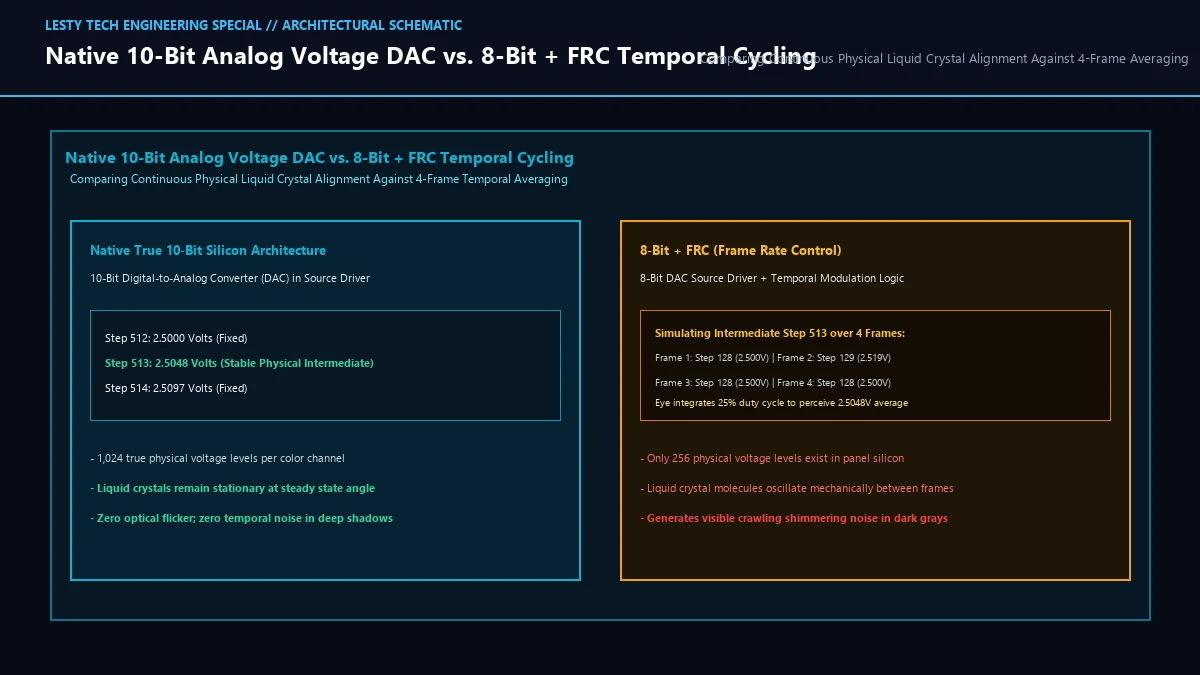
2. The Mechanics of Frame Rate Control (FRC): Temporal Dithering
Fabricating true 10-bit source driver silicon is expensive. A 10-bit DAC requires four times more precision resistor ladders and operational amplifiers than an 8-bit DAC, demanding larger silicon dies and driving up panel manufacturing costs by $200 to $500+.
To slash manufacturing costs while still claiming “1.07 Billion Colors” on the retail box, panel manufacturers deploy Frame Rate Control (FRC), an electronic temporal dithering technique implemented in the display’s Timing Controller (T-CON).
An 8-bit + FRC panel possesses only an 8-bit physical DAC capable of generating 256 real voltage steps. To simulate the three intermediate shades that exist between step N and step N+1, the T-CON rapidly cycles the subpixel’s brightness between step N and step N+1 across consecutive refresh frames:
| Desired 10-Bit Level | Frame 1 | Frame 2 | Frame 3 | Frame 4 | Perceived Brightness |
|---|---|---|---|---|---|
| Level N (Base 8-Bit) | VN | VN | VN | VN | 100% VN (Stable) |
| Level N + 0.25 (10-Bit) | VN+1 | VN | VN | VN | VN + 0.25 ΔV (Dithered) |
| Level N + 0.50 (10-Bit) | VN+1 | VN | VN+1 | VN | VN + 0.50 ΔV (50% Duty Cycle) |
| Level N + 0.75 (10-Bit) | VN+1 | VN+1 | VN+1 | VN | VN + 0.75 ΔV (Dithered) |
The human eye has an integration time (persistence of vision) of approximately 20 to 50 milliseconds. When a 120Hz or 144Hz monitor alternates subpixel brightness across four consecutive frames (a 4-frame cycle takes ~27.7ms at 144Hz), the human visual cortex averages the light pulses, perceiving an intermediate 10-bit luminance level.
3. The Real-World Visual Distortions of 8-Bit + FRC
While temporal FRC dithering performs adequately on static office spreadsheets, it introduces severe physical artifacts in high-performance computing, digital color grading, and competitive gaming:
- Near-Black Shimmering Noise: In dark HDR scenes (e.g., shadows in movies or dark environments in games), liquid crystal response times are at their slowest (black-to-dark-gray transitions take 15-25ms on IPS panels). Because the liquid crystals cannot physically twist and untwist fast enough to match the 144Hz FRC frequency, the temporal modulation produces visible crawling, shimmering pixel noise in near-black regions.
- Subconscious Optical Flicker and Eye Fatigue: Even when the human eye cannot consciously distinguish the individual frame flashes, high-speed photodiode oscilloscopes reveal continuous luminance ripple. For users sensitive to PWM (Pulse-Width Modulation) or temporal dithering, working on an 8-bit + FRC monitor for 8 hours frequently induces chronic headaches, eye strain, and visual fatigue.
- Spatial Checkerboard Artifacts: To prevent full-screen flashing, T-CONs implement spatial-temporal dithering: neighboring pixels alternate on inverted phases (checkerboard patterns). In high-contrast UI elements, CAD wireframes, or fine typography, this produces faint micro-checkerboard grid patterns.
4. The EDID and DisplayID Deception: Why Windows and macOS Lie
One of the most pervasive myths among hardware enthusiasts is that you can verify your monitor’s true bit depth by opening Windows Advanced Display Settings or macOS System Information.
If you connect an $250 8-bit + FRC gaming monitor to an RTX 4080 via DisplayPort, Windows will proudly report:
This telemetry metric is a dangerous half-truth.
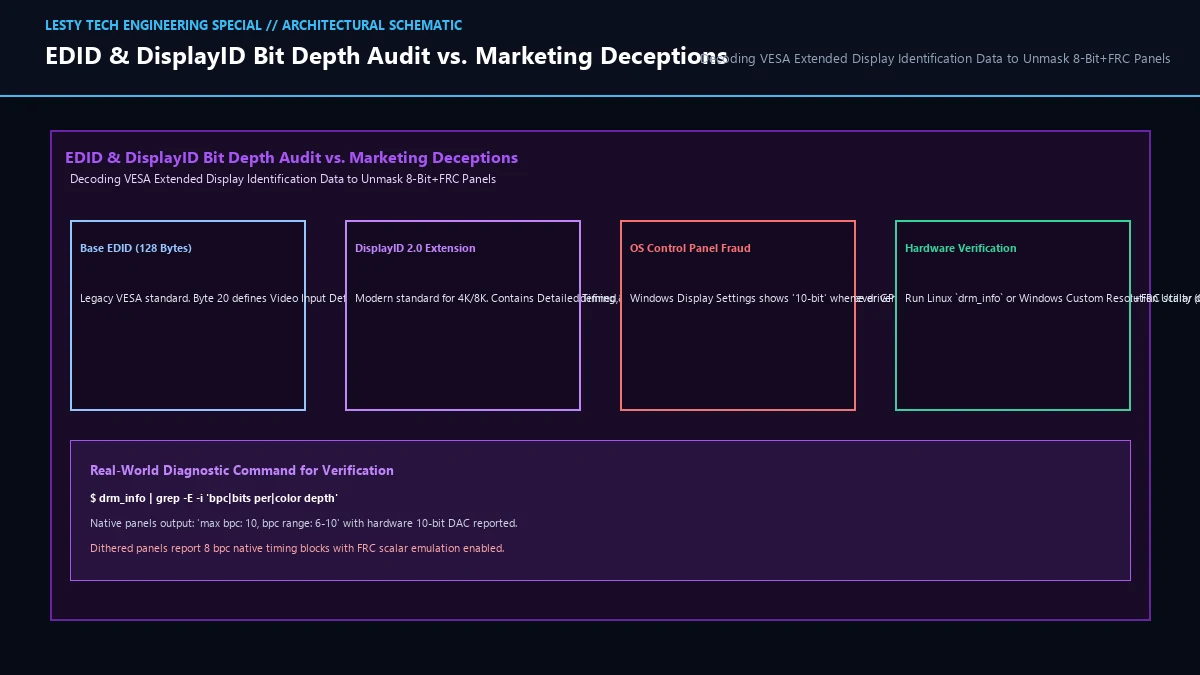
Windows Display Settings reports the GPU Transmission Link State, NOT the physical panel silicon capability!
When you enable HDR or set the GPU control panel to 10 bpc (bits per color), the GPU’s display engine packages a 10-bit uncompressed RGB signal into DisplayPort main-link symbols. The monitor’s scaler accepts the 10-bit stream over DisplayPort, then internal scalar logic truncates the signal down to 8 bits and applies temporal FRC dithering to the panel drive lines! The operating system has zero visibility into what happens after the DisplayPort receiver PHY.
5. GPU Driver Controls: NVIDIA, AMD, and Intel Settings Audited
Understanding how your graphics card driver interacts with the display controller is crucial to prevent unnecessary double-dithering:
NVIDIA Control Panel: Navigate to Change Resolution → Output Color Depth. Setting this to 10 bpc sends 30-bit RGB across the cable. If the display is an 8-bit + FRC monitor, the monitor’s T-CON performs temporal dithering. However, if you leave this set to 8 bpc, the NVIDIA driver itself will execute software spatial dithering via the GPU shader cores before transmission! Sending an 8-bit signal to an 8-bit monitor with GPU dithering is often preferable for users sensitive to panel FRC flicker.
AMD Software Adrenalin Edition: Under Gaming → Display, AMD exposes an explicit Color Depth (6 bpc, 8 bpc, 10 bpc, 12 bpc) toggle as well as a Pixel Format selector (RGB 4:4:4 Full RGB, YCbCr 4:4:4, YCbCr 4:2:2). Furthermore, AMD exposes a specialized “Dither” registry key (PP_Dither) that can forcefully disable GPU-side dithering across Radeon architectures.
DisplayPort 1.4 vs 2.1 Bandwidth Limits: At 4K resolution (3840 × 2160) and 144Hz refresh rate, an uncompressed True 10-bit RGB 4:4:4 signal requires a raw data rate of 35.83 Gbps. Because DisplayPort 1.4 caps out at 25.92 Gbps effective bandwidth, monitors must invoke Display Stream Compression (DSC 1.2a). In contrast, DisplayPort 2.1 (UHBR20) provides up to 77.37 Gbps, transmitting uncompressed native 10-bit and 12-bit signals effortlessly.
6. Hardware Calibration Pitfalls: Why 3D LUTs Break on 8-Bit + FRC
In professional Hollywood color grading and commercial prepress workflows, colorists use high-precision spectrophotometers (such as the Klein K10-A or X-Rite i1Pro 3) to build 33×33×33 or 65×65×65 3D Look-Up Tables (LUTs) using software like Calman or DisplayCAL.
When calibrating a True Native 10-bit display, every color patch measured by the probe corresponds to a fixed, stationary analog voltage level. The calibration software establishes a smooth, monotonic transfer function across the entire luminance curve.
However, when profiling an 8-bit + FRC monitor, the optical probe measures light integrated over hundreds of milliseconds while the panel’s subpixels are physically flickering between two discrete voltage steps. Because temporal FRC modulation is non-monotonic and exhibits tiny phase shifts depending on refresh rate, the spectrophotometer records noisy, fluctuating luminance readings in dark color patches. When the calibration software writes the generated 3D LUT back to the display hardware, the inverted calibration curves create severe posterization, false color contouring, and split-toning artifacts in near-black shadows—completely destroying professional color accuracy.
7. How to Authenticate True Panel Silicon: EDID Decoding and Panel Part Numbers
To uncover the absolute ground truth of your display silicon, you must bypass the OS UI and extract raw VESA Extended Display Identification Data (EDID) and DisplayID 2.0 blocks:
Method 1: Linux drm_info Direct Kernel Telemetry
On Linux, query the Direct Rendering Manager (DRM) kernel subsystem:
├───max bpc: range [6, 10] = 10
├───broadcast rgb: enum Full = Full
└───EDID: 00ffffffffffff00…
Decode the raw EDID byte 20 (Video Input Definition). In VESA EDID 1.4:
- Bits [6:4] =
010: 8 Bits per Primary Color Channel (Native 8-bit or 8-bit+FRC). - Bits [6:4] =
011: 10 Bits per Primary Color Channel (Certified True 10-Bit Source Silicon).
Method 2: Panel Model Lookup via Service Menus
The ultimate definitive proof of panel bit depth is the raw LCD/OLED panel part number (e.g., LG Display LM270WR8 or Samsung Display QD-OLED Gen 3). Access your monitor’s internal factory service menu (typically held via directional joystick power combinations) or inspect tear-down teardown databases (Panelook, TFTCentral). Panel datasheets state raw source driver IC specifications directly: “Native 8-bit + Hi-FRC” vs. “Native 10-bit (1.07B colors)”.
8. Panel Bit Depth Comparison: What Your Money Actually Buys
The following table breaks down the technical capabilities, artifacts, and target price points across display panel bit depth tiers:
| Panel Architecture | Native 8-Bit | 8-Bit + FRC (Temporal Dither) | True Native 10-Bit |
|---|---|---|---|
| Hardware Source Driver DAC | 8-Bit (256 steps) | 8-Bit (256 steps) + T-CON FRC | 10-Bit (1,024 true steps) |
| Physical Voltage Stability | 100% Stationary | Oscillates across 4 frames | 100% Stationary Physical Voltage |
| Near-Black Shimmering Noise | None (Quantization banding) | Moderate to Severe in dark HDR | Zero (Pristine clean shadow tones) |
| Temporal Eye Strain (Dither flicker) | None | Present (Varies by user sensitivity) | Absolute Zero Flicker |
| Typical Retail Price Bracket | $120 to $250 | $250 to $700 (90% of gaming market) | $900 to $4,000+ (OLED / Pro IPS) |
| Best Use Case | Office, Web, SDR Gaming | Mainstream High-Refresh Gaming | Hollywood Color Grading, Master HDR |
Display Panel True 10-Bit vs. 8-Bit + FRC Technical Guide
Hardware Source Driver DACs, Temporal Modulation Artifacts, and EDID Hardware Verification (Complete architectural audit with telemetry tables and schematic breakdowns).
Display_Panel_True_10Bit_vs_8Bit_FRC_Dithering_Technical_Guide.pdfFormat: PDF / KaTeX Telemetry