It is the nightmare scenario of every Linux systems engineer and DevOps site reliability team: at 3:14 AM on a weekend, a mission-critical PostgreSQL primary, an in-memory Redis cache instance, or an Elasticsearch data node suddenly ceases responding to network traffic. There was no kernel panic, no hardware power loss, and no clean application shutdown logged in user space. A frantic inspection of /var/log/kern.log or dmesg reveals the grim, cold verdict: Out of memory: Kill process 18942 (mysqld) score 892 or sacrifice child. In an instant, the Linux Out-Of-Memory (OOM) Killer terminated your core database process to preserve the operating system kernel.
While most administrators view the OOM Killer as an unpredictable, violent executioner that randomly strikes innocent processes, it is in reality the deterministic culmination of an architectural trade-off deeply embedded in Unix history: virtual memory overcommit. To maximize memory utilization, Linux deliberately lies to user-space applications, promising vast quantities of physical RAM that do not actually exist. When those optimistic promises collide with real-world write traffic, the kernel faces instantaneous memory exhaustion and unleashes a complex, heuristic scoring algorithm to select a victim. Here is the deep engineering guide to how Linux overcommit really works, the exact mathematical mechanics of the kernel’s oom_badness() scoring engine, and how to configure modern cgroups v2 and sysctl parameters to immunize your critical infrastructure.
1. The Virtual Memory Illusion: Why Linux Deliberately Lies to Applications
To understand why the OOM Killer exists, one must first dismantle a common misconception: allocating memory in Linux does not allocate physical RAM.
When a C/C++ application invokes malloc() (or when a Go or Java runtime requests memory via mmap() or brk()), the kernel does not assign physical DRAM memory frames to the process. Instead, the kernel merely updates the process’s Virtual Memory Area (VMA) tree, granting virtual address space descriptors. The kernel optimistically assumes that the process will never actually use all the memory it requested.
This behavioral policy is known as Memory Overcommit. It was designed decades ago to accommodate classic Unix process execution semantics: the fork() and exec() model. When an application forks a child process, POSIX semantics require the child to inherit an identical copy of the parent’s address space. If a database process consuming 64GB of RAM forks a small maintenance utility, a strict non-overcommit operating system would require 64GB of free physical RAM immediately available just to execute the fork!
Linux sidesteps this problem through Copy-on-Write (COW). The child process receives duplicate virtual page table mappings marked as read-only. Physical DRAM is only allocated when either the parent or child writes to a page, triggering a hardware page fault that prompts the kernel to allocate a single 4KB physical frame.
Linux memory overcommit behavior is controlled globally via the vm.overcommit_memory sysctl knob:
| Mode Value | Kernel Policy | Architectural Behavior |
|---|---|---|
| vm.overcommit_memory = 0 | Heuristic Overcommit (Default) | The kernel uses a rough internal heuristic. It allows reasonable overcommits but rejects obviously insane virtual memory allocations (e.g. requesting 1 Terabyte on an 8GB machine). |
| vm.overcommit_memory = 1 | Always Overcommit | The kernel unconditionally approves every memory request regardless of physical RAM size. (Mandatory for Redis background saving). |
| vm.overcommit_memory = 2 | Strict / Don’t Overcommit | The kernel enforces a strict mathematical ceiling. Allocations that would breach the CommitLimit are immediately rejected with NULL (ENOMEM). |
Under strict mode (vm.overcommit_memory = 2), the total allowable virtual memory commitment across all processes is governed by the CommitLimit formula:
You can inspect your system’s live commitment accounting in real time via /proc/meminfo:
CommitLimit: 32849120 kB ; Maximum allowable committed memory
Committed_AS: 28410240 kB ; Virtual memory currently promised to all processes
If Committed_AS exceeds CommitLimit when overcommit mode 2 is active, subsequent memory requests instantly fail, preventing OOM panics at the cost of application crashes.
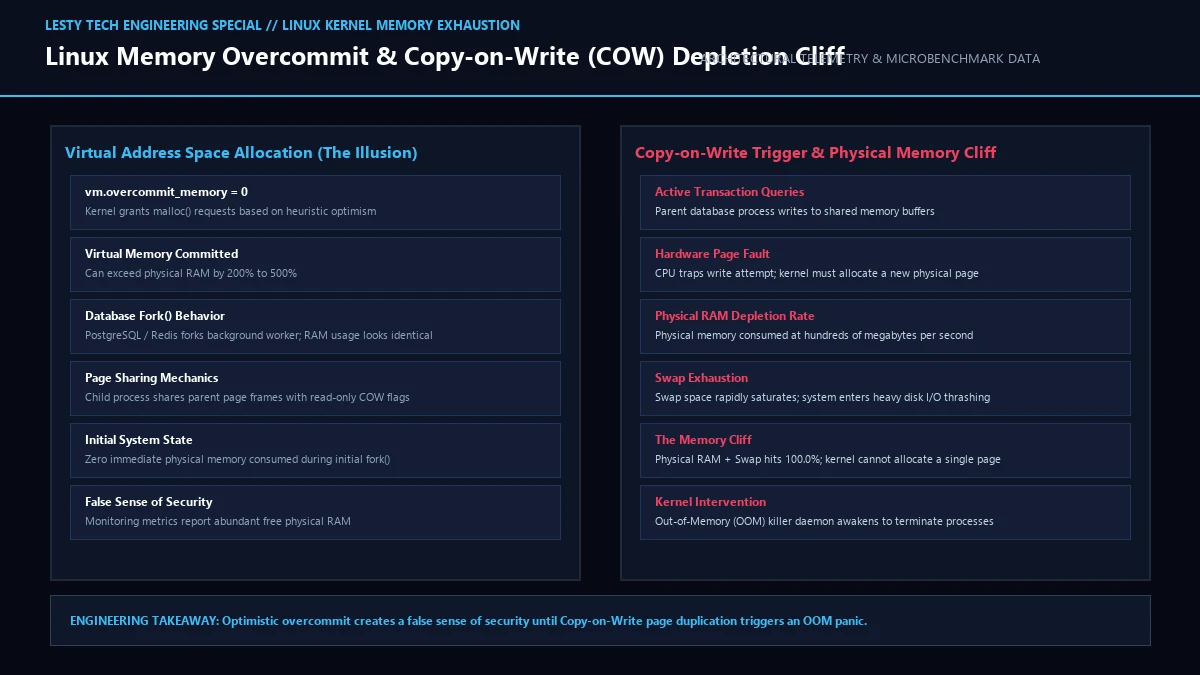
2. The Copy-on-Write Memory Cliff: The Redis Disaster Scenario
The fatal danger of overcommit occurs when applications that allocated vast virtual address spaces actually begin writing to their pages. Consider the infamous Redis BGSAVE catastrophic crash.
Redis operates entirely in memory. To create a persistent RDB snapshot on disk without blocking active client requests, Redis invokes fork() to spawn a background child worker. The child process begins serializing the in-memory dataset to an .rdb file.
If the Redis host has 64GB of RAM and the Redis instance consumes 50GB, the moment fork() executes, the kernel creates a child process whose virtual memory footprint is also 50GB. Initially, zero extra RAM is consumed thanks to Copy-on-Write page table sharing.
However, while the background child is writing the snapshot, client write requests continue flooding the parent Redis process. Every time Redis updates a cache key, the CPU triggers a page fault on the shared read-only page. The Linux kernel must duplicate the 4KB page in physical RAM. If client write traffic is intense, the parent process dirties thousands of pages per second.
Physical RAM and swap space rapidly evaporate. When the kernel attempts to allocate a new 4KB frame and finds that free memory plus reclaimable page cache has reached absolute zero, it enters emergency direct page reclaim. When reclaim fails, the kernel has only two choices: freeze completely in an unrecoverable kernel panic, or invoke the Out-Of-Memory Killer.
3. Anatomy of `oom_badness()`: How the Kernel Picks Its Victims
When the OOM Killer is triggered, it does not pick a process at random. It iterates through every active task in the system’s process table (excluding kernel threads and PID 1 systemd) and calculates a mathematical score between 0 and 1000 using the internal kernel function oom_badness() (located in mm/oom_kill.c).
The mathematical score is computed using the following rigorous logic:
points = get_mm_rss(p->mm) + get_mm_counter(p->mm, MM_SWAPENTS);
// Normalize points against total available system memory
score = (points * 1000) / totalpages;
// Apply user-space bias adjustment (-1000 to +1000)
score += p->signal->oom_score_adj;
The scoring algorithm evaluates three primary factors:
- Physical Memory Footprint: The base points equal the sum of the process’s Resident Set Size (RSS) in physical RAM plus its anonymous pages swapped out to swap space (
MM_SWAPENTS). Page table allocation overhead is also factored in. Notice that file-backed clean memory pages (such as executable code segments and shared libraries) are not counted against the process, because the kernel can evict them to disk without swap space. - Shared Memory and Thread Group Dynamics: For multi-threaded applications, all threads share the same
mm_structdescriptor. The kernel evaluates the memory consumption of the entire thread group collectively. Shared memory segments (such as POSIX shared memory or System V IPC) are accounted for proportionally across attaching processes. - System Memory Proportion: The raw page count points are scaled relative to total system memory (RAM + Swap), producing a normalized base score between 0 and 1000. A process consuming 50% of the host’s total RAM receives an unadjusted base score of 500.
- The oom_score_adj Modifier: The kernel adds the value of
/proc/[pid]/oom_score_adj, an integer configurable by systems administrators ranging from -1000 to +1000. If the resulting score falls below zero, it clamps to zero; if it exceeds 1000, it clamps to 1000.
The process that ends up with the highest final score is selected as the victim. The kernel sends a non-catchable SIGKILL signal directly to the thread group leader, freeing all its allocated physical pages back to the system’s memory buddy allocator.
Real-Time Forensic Inspection with eBPF and Procfs
When diagnosing post-mortem OOM events, relying solely on syslog entries often misses critical pre-kill memory trajectory signals. Modern site reliability engineers leverage Extended Berkeley Packet Filters (eBPF) to hook into the kernel’s memory allocation tracepoints.
Using the BCC toolkit’s oomkill.bt or custom bpftrace probes attached to kprobe:oom_kill_process, administrators can capture the exact microsecond timestamp, calling process hierarchy, CPU core, and complete cgroup path before the victim is terminated:
sudo bpftrace -e ‘kprobe:oom_kill_process {
time(“%H:%M:%S “);
printf(“OOM Triggered by PID %d (%s) -> Victim PID %d (%s) Score %d\n”,
pid, comm, ((struct task_struct *)arg0)->pid,
((struct task_struct *)arg0)->comm, arg2);
}’
This real-time tracing reveals whether a background batch cronjob triggered the memory allocation surge that ultimately caused the kernel to sacrifice your primary database instance.
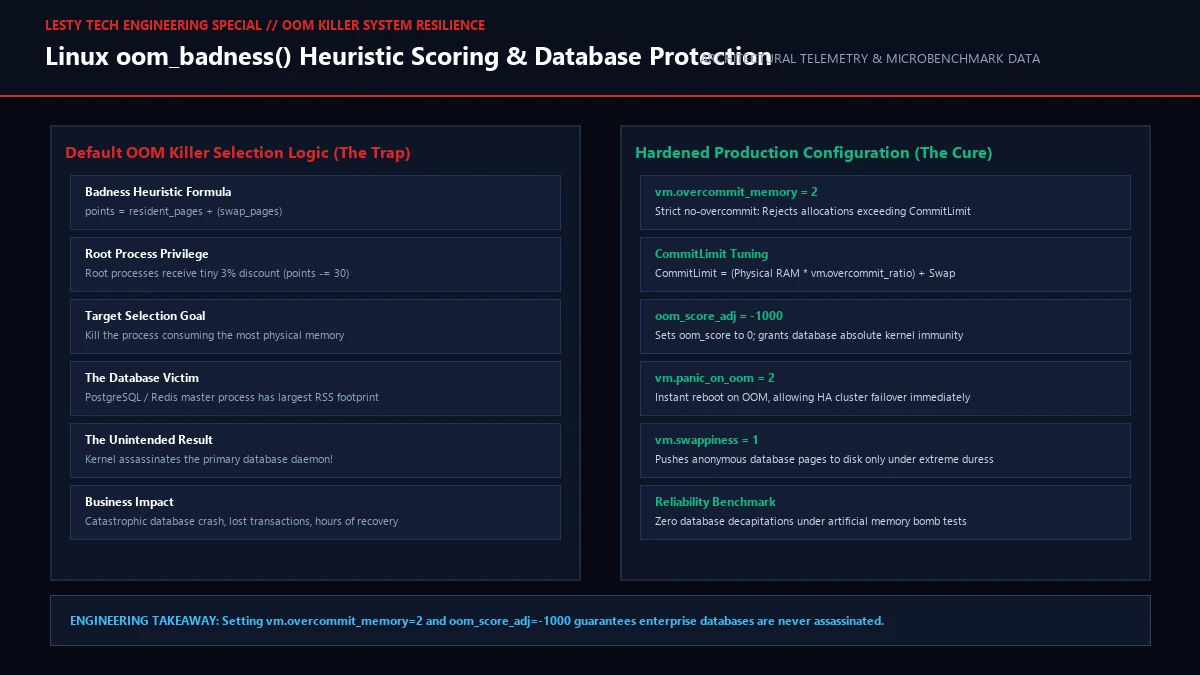
4. The oom_score_adj Magic: Protecting Mission-Critical Daemons
Because the kernel targets the largest consumer of physical RAM, your most critical stateful daemonsPostgreSQL, MySQL, Redis, ClickHouse, and JVM application serversare almost guaranteed to be selected as the primary target!
To protect critical services from being slaughtered, Linux provides the oom_score_adj tuning interface in procfs:
- Score -1000 (OOM_SCORE_ADJ_MIN): Completely immunizes the process. The kernel’s
oom_badness()function explicitly skips any task whose adjustment is set to -1000. It will never be killed by the OOM Killer under any circumstances (even if the kernel must crash). - Score -500 to -999: Heavily reduces the process’s likelihood of being chosen, ensuring smaller background tasks or batch workers are sacrificed first.
- Score +1000 (OOM_SCORE_ADJ_MAX): Maximizes target priority. The process will be the very first process killed when memory pressure spikes (ideal for ephemeral cache warmers or untrusted sandbox scripts).
In modern systemd-managed Linux environments, you should never edit /proc/[pid]/oom_score_adj manually with shell scripts. Instead, configure the service unit file directly using the OOMScoreAdjust directive:
[Service]
OOMScoreAdjust=-900
# Reload systemd and apply:
sudo systemctl daemon-reload && sudo systemctl restart postgresql
5. The Modern Cgroups v2 Paradigm: Localizing OOM in Kubernetes
In modern cloud infrastructure, running monolithic virtual machines is increasingly rare. Workloads run inside container runtimes (Docker, containerd, Kubernetes) governed by Linux Control Groups (cgroups).
Under legacy cgroups v1, container memory limits were notoriously fragile. When a container exceeded its allocated memory ceiling, the kernel’s global OOM killer intervened, frequently killing arbitrary processes inside the container without terminating the container itselfleaving “zombie” half-dead containers running in production.
Cgroups v2 fundamentally overhauled memory management with unified, deterministic controllers:
| Cgroup v2 Knob | Kubernetes Mapping | Operational Functionality |
|---|---|---|
| memory.min | Hard Memory Reservation | Guaranteed physical memory protection. The kernel will never reclaim page cache or anonymous memory from this cgroup under any system pressure. |
| memory.low | resources.requests.memory |
Soft memory protection. The kernel avoids reclaiming memory unless all unprotected cgroups have been stripped. |
| memory.high | Proactive Memory Throttling | Soft memory ceiling. When breached, the kernel does not kill the process; it injects artificial IO delays to throttle memory allocation rate. |
| memory.max | resources.limits.memory |
Hard memory limit. Breaching this threshold immediately triggers cgroup-level direct reclaim, followed by cgroup OOM. |
| memory.oom.group | All-or-Nothing Pod Eviction | When set to 1, if any process in the cgroup triggers OOM, the kernel atomically kills EVERY process in the cgroup simultaneously, enabling clean container restarts. |
6. Master Production Sysctl Tuning Guide
To harden enterprise Linux production hosts against memory instability, add the following optimized kernel parameters to /etc/sysctl.d/99-memory-tuning.conf:
# 1. Protect against catastrophic memory overcommit cliffs
vm.overcommit_memory = 0
vm.overcommit_ratio = 50
# 2. Maintain a healthy reserve buffer for kernel interrupts
vm.min_free_kbytes = 1048576 # 1GB reserve buffer on 64GB+ hosts
# 3. Prevent aggressive swapping while maintaining emergency spillover
vm.swappiness = 10
# 4. Retain directory and inode caches to prevent disk trashing
vm.vfs_cache_pressure = 50
# 5. Enable emergency panic and reboot on unrecoverable OOM (optional for HA clusters)
vm.panic_on_oom = 0
Linux Virtual Memory Overcommit & OOM Killer Handbook
Kernel Badness Heuristics, Copy-on-Write Failure Modes, and Production Cgroups v2 Hardening (Complete architectural audit with telemetry tables and schematic breakdowns).
Linux_Memory_Overcommit_and_OOM_Killer_Tuning_Handbook.pdfFormat: PDF / KaTeX Telemetry
Frequently Asked Questions (FAQ)
1. Should I disable swap space entirely to avoid slow disk thrashing?
No, disabling swap completely is an anti-pattern. Even on ultra-fast NVMe servers, having a modest swap partition (4GB to 8GB) or zram swap provides a vital release valve. When memory pressure rises, the kernel can swap out completely idle, stagnant memory pages (such as initialization routines or unused systemd daemons), freeing physical RAM for active file caches. If a system has zero swap, the moment physical memory hits 100%, the OOM killer triggers instantly without warning.
2. Can the OOM Killer target the root process or PID 1?
No. PID 1 (which is systemd or init) and all kernel threads (such as kswapd0) are explicitly protected in the Linux kernel source code. The function oom_badness() contains a strict check: if p->pid == 1 or if the task is a kernel thread (p->flags & PF_KTHREAD), the function returns 0 immediately, guaranteeing that core system orchestration is never terminated.
3. Why does Redis recommend setting vm.overcommit_memory = 1?
Under default heuristic overcommit (mode 0), when Redis calls fork() to perform a background disk save (bgsave), the kernel checks if enough free memory exists to duplicate the entire virtual footprint. If Redis uses 20GB on a 32GB server, the kernel may conservatively reject the fork() call with an ENOMEM error, preventing Redis from persisting data. Setting vm.overcommit_memory = 1 forces the kernel to approve the fork unconditionally, relying on Copy-on-Write to minimize actual physical RAM allocation.