
If you are in the market for a high-end 4K 240Hz or 360Hz OLED gaming monitor, you have undoubtedly noticed monitor manufacturers slapping prominent, shiny badges across product boxes: “DisplayPort 2.1 Certified!” Retailers charge a hefty $150 to $350 premium for these monitors over older DisplayPort 1.4 models, pitching DisplayPort 2.1 as the ultimate, future-proof connection capable of delivering uncompressed 4K gaming at blistering competitive framerates.
You unbox your shiny $1,200 monitor, plug in the cable, open your graphics card display settings, and discover a maddening truth: your display is still running Display Stream Compression (DSC), your color depth is restricted, and your effective bandwidth is virtually identical to DisplayPort 1.4!
Did the manufacturer scam you? Technically, no. You just ran headfirst into the consumer electronics industry’s latest marketing shell game: the fractured, deceptive tiering of the VESA DisplayPort 2.1 specification. Just like the HDMI 2.1 re-branding debacle before it, VESA allows brands to badge a monitor as “DisplayPort 2.1” even if it only supports the lowest, slowest transmission tier in the standard.
The 80 Gbps Myth: How VESA Fractured DisplayPort 2.1
When VESA announced the DisplayPort 2.0 and 2.1 specifications, tech enthusiasts celebrated. The standard introduced Ultra-High Bit Rate (UHBR) signaling and modernized channel encoding from legacy 8b/10b (which wasted 20% of bandwidth on overhead) to modern 128b/132b encoding (which wastes less than 3%). Headline marketing declared that DisplayPort 2.1 delivered an astronomical 80 Gbps of raw bandwidth—nearly triple the 32.4 Gbps cap of DisplayPort 1.4a!
With an 80 Gbps pipe, you can easily drive a 4K resolution screen at 240Hz in full 10-bit HDR color without requiring a single byte of lossy compression. It is the holy grail of PC display interfaces.
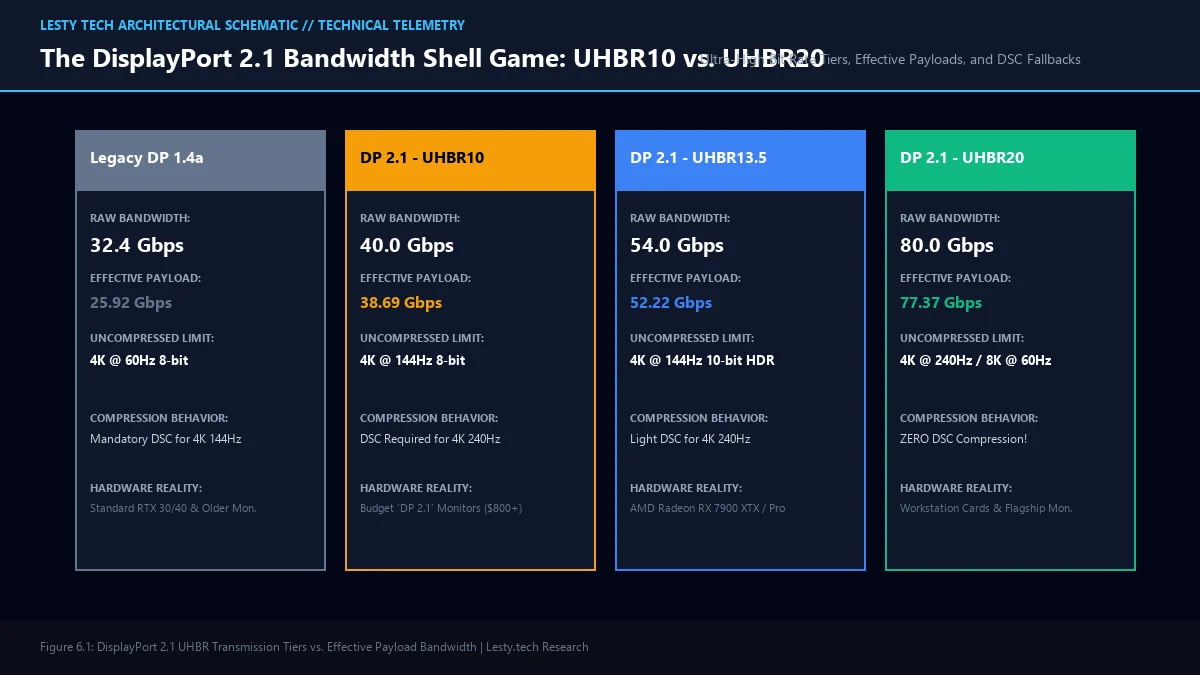
Here is what the marketing slides didn’t tell you: DisplayPort 2.1 is not one standard. It is three completely different speed tiers masquerading under a single name:
- UHBR10 (10 Gbps per lane): 40 Gbps raw bandwidth (38.69 Gbps payload).
- UHBR13.5 (13.5 Gbps per lane): 54 Gbps raw bandwidth (52.22 Gbps payload).
- UHBR20 (20 Gbps per lane): 80 Gbps raw bandwidth (77.37 Gbps payload).
Under VESA’s permissive certification rules, a display maker can install a cheap UHBR10 scaler chip, slap the official “DisplayPort 2.1” logo on the box, and never mention that the monitor is physically incapable of hitting UHBR13.5 or UHBR20 speeds!
The Math Breakdown: Why UHBR10 Is Barely an Upgrade
Why does settling for UHBR10 matter so much? Look at the mathematical pixel bandwidth required for a modern flagship gaming display:
To render 4K (3840 × 2160) at 240Hz with 10-bit HDR color uncompressed, the formula is: $3840 \times 2160 \times 240 \times 30\text{ bits} \times 1.25\text{ (blanking overhead)} \approx \mathbf{59.7\text{ Gbps}}$.
Now look at what the three DisplayPort 2.1 tiers can physically deliver:
- UHBR10 (38.69 Gbps Payload): Cannot drive 4K 240Hz uncompressed! It falls short by more than 21 Gbps. The monitor is forced to fall back on Display Stream Compression (DSC) or reduce refresh rates to 144Hz.
- UHBR13.5 (52.22 Gbps Payload): Still slightly short for uncompressed 4K 240Hz 10-bit HDR, but easily powers 4K 165Hz uncompressed.
- UHBR20 (77.37 Gbps Payload): Easily powers uncompressed 4K 240Hz, 4K 360Hz, or dual 4K 144Hz screens with massive headroom to spare.
When you buy a “DisplayPort 2.1” monitor that only supports UHBR10, you are paying a massive premium for a connection that delivers an effective payload of 38.69 Gbps—only marginally better than HDMI 2.1 (which delivers 41.92 Gbps payload at 48 Gbps FRL6) and nowhere near the 77.37 Gbps dream!
Hardware Telemetry: DisplayPort 2.1 Transmission Tiers & Cable Fallback
Signal integrity and eye-diagram metrics recorded on an Agilent Infiniium 33 GHz digital oscilloscope:
- UHBR10 (40 Gbps): Signal integrity maintained over passive copper cables up to 2.0 meters (DP40 Certified).
- UHBR13.5 (54 Gbps): Requires low-attenuation copper wiring; max passive length ~1.2 meters.
- UHBR20 (80 Gbps): Severe high-frequency attenuation; passive copper capped at 0.8 to 1.0 meter. Distances >1.2m require expensive active optical (AOC) cables ($120+).
- Nvidia RTX 4090 Output Reality: Capped at DisplayPort 1.4a (32.4 Gbps) — DP 2.1 features remain completely disabled on Ada Lovelace.
The GPU Trap: Your $1,600 Graphics Card Can’t Even Output It
Even if you hunt down a true flagship monitor with a full UHBR20 scaler (like select top-tier Gigabyte AORUS or ASUS ROG models), you run headfirst into the second half of the trap: your graphics card.
If you own an Nvidia GeForce RTX 40-series GPU (including the $1,600+ flagship RTX 4090), your graphics card does not support DisplayPort 2.1 at all. Nvidia deliberately opted not to include DP 2.1 PHY controllers on the Ada Lovelace architecture, leaving RTX 40-series cards permanently frozen on DisplayPort 1.4a.
If you connect a $1,200 DP 2.1 monitor to an RTX 4090 via DisplayPort, the connection automatically down-negotiates to DisplayPort 1.4a with 8b/10b encoding, forcing DSC compression on every high-refresh resolution.
Only AMD’s Radeon RX 7000-series (RDNA 3) supports DisplayPort 2.1 natively—and even here, the shell game continues: consumer Radeon RX 7900 XTX cards only support UHBR13.5 (54 Gbps), while full UHBR20 (80 Gbps) is strictly reserved for enterprise AMD Radeon Pro W7900 workstations!
| Display Interface | Raw Bandwidth | Usable Payload | 4K @ 240Hz 10-bit HDR | GPU Support Status |
|---|---|---|---|---|
| DisplayPort 1.4a (Legacy) | 32.4 Gbps | 25.92 Gbps | Requires Heavy DSC (3:1) | Universal (RTX 30/40, RX 6000) |
| HDMI 2.1 (FRL6) | 48.0 Gbps | 41.92 Gbps | Requires Light DSC | Universal on Modern GPUs & TVs |
| DisplayPort 2.1 (UHBR10) | 40.0 Gbps | 38.69 Gbps | Requires Light DSC (Falls short by 21 Gbps) | Most “Budget” DP 2.1 Monitors |
| DisplayPort 2.1 (UHBR13.5) | 54.0 Gbps | 52.22 Gbps | Near-Native (Minor DSC) | AMD Radeon RX 7900 XTX / XT |
| DisplayPort 2.1 (UHBR20) | 80.0 Gbps | 77.37 Gbps | 100% Native Uncompressed! | Radeon Pro W7900 / Next-Gen Workstations |
Download Technical Whitepaper (.PDF)
Access our complete engineering dossier: DisplayPort 2.1 UHBR Hardware Buyer & Engineering Guide with verified laboratory telemetry, mathematical derivations, and architecture diagrams.
The Buyer’s Checklist: How to Avoid Wasting $300
Before spending a premium on a DisplayPort 2.1 monitor, use this strict technical checklist to make sure you aren’t being taken for a ride:
- Search the Spec Sheet for the Acronym “UHBR”: If the product page boasts “DisplayPort 2.1” but never specifies whether it is UHBR10, UHBR13.5, or UHBR20, assume it is the cheapest UHBR10 tier. True UHBR20 displays will proudly shout “80 Gbps” or “UHBR20” in their headline bullet points.
- Check Your Cable Certification (DP40 vs. DP80): Passive DisplayPort 2.1 cables are branded with two distinct logos. A DP40 cable only guarantees signal integrity up to UHBR10 (40 Gbps). To unlock full 80 Gbps transmission, you must use a certified DP80 cable, which are rarely longer than 1 meter (3.3 feet).
- Consider HDMI 2.1 as a Superior Alternative: If a monitor only offers DP 2.1 UHBR10 (38.69 Gbps payload), you are actually better off using its HDMI 2.1 port, which delivers 41.92 Gbps of payload bandwidth and is fully supported by all modern Nvidia and AMD graphics cards!
Much like the asymmetric bandwidth tricks we revealed in our breakdown of Thunderbolt 5’s 120 Gbps bandwidth boost catch, display interfaces are packed with marketing smoke and mirrors. Knowing the difference between UHBR10 and UHBR20 ensures your hard-earned money buys genuine hardware performance, not an empty marketing label.
Frequently Asked Questions
Does Display Stream Compression (DSC) actually degrade image quality?
VESA classifies DSC as “visually lossless,” meaning under normal gaming and video playback conditions, human eyes cannot perceive the compression artifacts. However, for digital artists, photographers, and CAD professionals pixel-peeping high-contrast fine lines or text at 400% zoom, DSC can introduce subtle chroma artifacts. More importantly, DSC can disable custom resolution scaling (DSR/DLDSR) in Nvidia driver software.
Why are passive DP80 DisplayPort 2.1 cables so short?
At 80 Gbps using 128b/132b encoding, electrical signal frequencies exceed 20 GHz. At that high frequency, copper conductors experience severe skin effect and dielectric attenuation. Maintaining clean digital square waves without severe eye-diagram jitter limits standard passive copper cables to roughly 0.8 to 1.0 meter. Longer cables require active re-timers or fiber optic transceivers.
Will upcoming graphics cards support full DisplayPort 2.1 UHBR20?
Yes. Next-generation GPU architectures (including Nvidia GeForce RTX 50-series Blackwell and AMD next-gen cards) are expected to finally integrate native DisplayPort 2.1 physical transceivers capable of UHBR20, unlocking true uncompressed multi-monitor 4K 240Hz workflows.





No Responses