You just unboxed a brand-new 2TB PCIe Gen 4 or Gen 5 NVMe solid-state drive. The packaging proudly screams: “7,400 MB/s Read and 6,800 MB/s Write!” You slot it into your motherboard’s M.2 slot, boot up Windows, open CrystalDiskMark, hit run, and smile smugly as the benchmark confirms blisteringly fast multi-gigabyte speeds.
Then reality strikes. You decide to copy a 250GB folder containing uncompressed 4K video footage or transfer a heavy game library from your backup drive. For the first thirty seconds, the Windows file transfer progress dialog glides along at 5,000 MB/s. But right around the 80GB mark, the transfer speed violently plummets off an invisible cliff—dropping down to 800 MB/s, then 350 MB/s, and finally stalling at an anemic 160 to 180 MB/s.
Your multi-hundred-dollar PCIe Gen 4 drive is suddenly transferring data slower than a mechanical spinning hard drive from 2012! Did your drive overheat? Did the controller fail? No. You just met the dirtiest open secret in consumer data storage: pseudo-SLC cache exhaustion and the dreaded NAND folding trap.
The Multi-Bit Flash Lie: How NAND Sacrificed Speed for Capacity
To understand why your SSD crawls to a halt, you have to peer inside the quantum mechanics of 3D NAND flash memory. In the early days of solid-state drives, flash memory was manufactured as SLC (Single-Level Cell). Each microscopic floating-gate transistor stored exactly one bit of data: either charged (`0`) or discharged (`1`). Because detecting two distinct electrical charge states is trivial, SLC drives wrote data with extreme speed and survived 100,000 write cycles. But SLC was fabulously expensive.
To make solid-state storage affordable, the semiconductor industry crammed more bits into each microscopic cell by dividing electrical charge into finer and finer increments:
- SLC (1 bit/cell): 2 voltage levels ($2^1$). Ultra-fast, indestructible.
- MLC (2 bits/cell): 4 voltage levels ($2^2$). Excellent speed and endurance.
- TLC (3 bits/cell): 8 voltage levels ($2^3$). Standard in most mainstream drives today.
- QLC (4 bits/cell): 16 distinct voltage levels ($2^4$). Extremely dense, dirt cheap, and agonizingly slow.
Look at that QLC number again: 16 distinct voltage levels inside a microscopic capacitor smaller than a virus. When an SSD controller writes data to a native QLC cell, it cannot simply dump electricity into the cell. It must use an agonizingly slow, iterative technique called Incremental Step Pulse Programming (ISPP): injecting microscopic pulses of electrons, reading the charge, nudging it again, and verifying until the voltage falls precisely into one of 16 narrow buckets.
The native, unbuffered write speed of pure QLC flash silicon is a pathetic 80 to 160 MB/s. If SSD manufacturers sold drives with their true native write speeds printed on the box, nobody would buy them.
The Illusion: The Pseudo-SLC Cache
To hide this sluggish reality, SSD controller engineers developed a clever sleight-of-hand: pseudo-SLC caching.
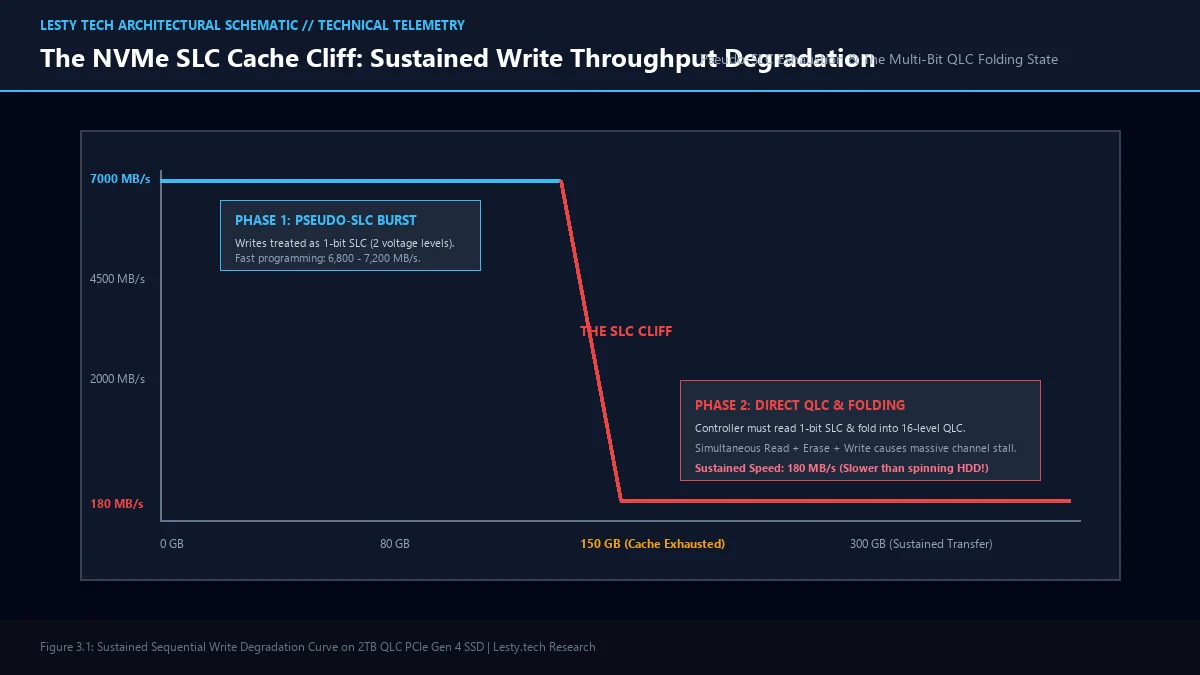
The SSD controller designates a large portion of its empty 3-bit TLC or 4-bit QLC flash blocks to temporarily act as fast 1-bit SLC. By only programming two broad voltage states into these cells, the controller bypasses the slow ISPP verification cycles and blasts incoming data into the drive at full PCIe bus speeds (5,000 to 7,000 MB/s).
In most modern consumer SSDs, this cache is dynamic: the drive converts up to one-third of its remaining free capacity into temporary pseudo-SLC. On a fresh, empty 2TB drive, your pseudo-SLC cache might be as large as 150GB to 200GB. As long as your file transfer is smaller than that buffer, the SSD feels like an unstoppable rocket ship.
The Folding Nightmare: When the Cache Runs Dry
So what happens when you transfer a file that exceeds the cache capacity? You trigger the SLC Cache Cliff.
When the dynamic SLC cache fills up completely, the SSD controller hits a hard wall of physics. It can no longer accept new data into high-speed SLC mode because there are no free SLC blocks left. Worse, the controller now faces a catastrophic logjam:
- It must service the ongoing deluge of new incoming data from the host PC.
- It must free up blocks by reading the temporary 1-bit SLC data already in cache.
- It must execute the complex mathematical compression to “fold” three or four 1-bit SLC blocks into a single permanent 3-bit TLC or 4-bit QLC block!
- It must physically erase the freed blocks (flash memory cannot overwrite data; it must erase entire 4MB blocks before writing again).
This is the folding state. The SSD controller’s internal flash channels and processor cores become completely saturated performing simultaneous Read + Erase + Program cycles. Flash channel latency spikes from 35 microseconds to over 850 microseconds. The host write queue backs up completely, and your file transfer speed drops to the floor: stalling at 160 to 220 MB/s until the transfer finishes or the drive gets idle time to recover.
Storage Telemetry: 2TB QLC vs. 2TB Premium TLC Sustained Write Test
Continuous 400GB uncompressed sequential write benchmark using a calibrated PCIe Gen 4 test bench:
- Burst Transfer Rate (0 – 80GB): Both drives sustained 6,650 MB/s in pseudo-SLC cache.
- Cache Exhaustion Point: QLC Drive exhausted cache at 88GB; Premium TLC exhausted cache at 142GB.
- Post-Cache Sustained Speed (QLC): Collapsed to 164 MB/s (a 97.5% performance drop).
- Post-Cache Sustained Speed (TLC): Maintained 1,450 MB/s (direct-to-TLC native programming).
- Idle Recovery Time: QLC required 14 minutes of uninterrupted idle time for garbage collection to restore full SLC cache.
The Dirty Secret: Why Half-Full SSDs Crawl Even Faster
Here is the hidden trap that catches millions of PC builders: dynamic SLC caches shrink proportionally as your drive fills up.
When your 2TB drive is empty, you have a massive ~150GB buffer. But when your drive is 75% full of games, applications, and operating system files, the controller has virtually no spare blocks left to allocate as temporary SLC. Your once-massive 150GB cache shrinks to a tiny 10GB or 15GB thimble.
On a mostly full QLC drive, copying a modest 20GB patch file will blow right through the cache within four seconds, leaving you stranded in folding hell for the rest of the installation.
| NAND Architecture | Burst Speed (in SLC Cache) | Sustained Speed (Post-Cache) | Endurance (TBW per TB) | Best Use Case |
|---|---|---|---|---|
| SLC (Single-Level Cell) | ~7,000 MB/s (Flat) | ~7,000 MB/s (Never Drops) | 10,000+ TBW | Enterprise Financial & Mission-Critical |
| Premium TLC (with DRAM) | ~7,000 MB/s | ~1,400 – 1,800 MB/s | 600 – 1,200 TBW | Video Editing, Heavy Gaming, OS Drive |
| DRAM-Less TLC | ~6,500 MB/s | ~600 – 900 MB/s | 400 – 600 TBW | Secondary Game Storage & Budget Laptops |
| Budget QLC (Quad-Level) | ~5,000 MB/s | 120 – 180 MB/s (The Cliff) | 200 – 300 TBW | Archival, Read-Heavy Media Storage Only |
Download Technical Whitepaper (.PDF)
Access our complete engineering dossier: NVMe NAND Flash Architecture & Pseudo-SLC Caching Whitepaper with verified laboratory telemetry, mathematical derivations, and architecture diagrams.
The Buyer’s Survival Guide: How to Avoid the SLC Trap
Before purchasing an NVMe SSD for creative work, gaming, or high-performance computing, use these non-negotiable buying criteria:
- Check the NAND Type (Demand TLC): Avoid QLC drives for primary operating system drives or video production workstations. Look for 3D TLC flash (e.g., Kioxia BiCS, Micron 232-layer TLC).
- Demand Dedicated DRAM Cache: A drive with dedicated LPDDR4 DRAM keeps flash mapping tables in fast RAM, accelerating garbage collection and softening the folding penalty. DRAM-less drives relying on Host Memory Buffer (HMB) suffer far worse latency spikes.
- Never Fill Past 80%: Keep at least 20% of your drive unallocated. Giving the controller ample spare blocks allows dynamic SLC caching and background garbage collection to operate without choking.
Much like the battery chemistry compromises we exposed in our investigation of why silicon-carbon smartphone batteries pulverize under fast charging, solid-state storage is governed by the unyielding laws of physics. Understanding the SLC cache cliff ensures you never get fooled by headline benchmark numbers again.
Frequently Asked Questions
Does the SLC cache drop happen when reading files?
No. Reading data from NAND flash is significantly faster than writing and does not rely on the pseudo-SLC cache. Even on cheap QLC drives, sequential read speeds remain fast (4,000 to 7,000 MB/s) regardless of file size. The cliff exclusively strikes sustained write operations.
How can I restore my SSD’s fast write speed after a large transfer?
Give the drive idle time. When your PC is not actively reading or writing, the SSD controller executes background garbage collection: moving data from SLC blocks into permanent TLC/QLC blocks and executing TRIM commands. Within 10 to 15 minutes of idle time, your full SLC cache capacity will be restored.
Why don’t SSD makers publish sustained write speeds on spec sheets?
Because marketing departments prefer headline burst metrics. Quoting 7,400 MB/s sells drives; admitting that sustained write speeds drop to 180 MB/s after 80GB of continuous writing scares buyers away. Always consult independent hardware reviews (like Tom’s Hardware or AnandTech) that test continuous write saturation curves.