For more than forty years, the enthusiast PC and competitive esports landscape worshipped at a single mechanical altar: the Cherry MX mechanical switch. Whether you preferred the tactile bump of a Brown switch, the deafening click of a Blue, or the smooth glide of a Red, the fundamental physics inside every keyboard remained unchanged. When you pressed a keycap, a plastic stem pushed two flexible metal leaves together, completing an electrical circuit. Typing and gaming were purely binary events: the switch was either on, or it was off.
Today, that forty-year mechanical dynasty is facing complete extinction. Across professional competitive circuits in Valorant, Counter-Strike 2, and osu!, esports athletes are mass-migrating to Hall Effect (HE) magnetic switches (popularized by brands like Wooting, Razer Huntsman V3, and SteelSeries Apex Pro). Pro players swear that magnetic switches provide an almost illegal competitive advantage, allowing instantaneous counter-strafing and lightning-fast directional stops.
The marketing buzzword driving this frenzy is “Rapid Trigger”: the ability to adjust your key’s actuation and reset points down to a microscopic 0.1 millimeters of travel. But behind the glossy marketing reels lies a delicate physical reality that keyboard influencers rarely mention: Hall effect switches measure microscopic magnetic fields that are vulnerable to thermal drift. As your room warms up or keyboard RGB LEDs heat the PCB, your actuation points can drift by over 0.2 millimeters—causing phantom keypresses and missed inputs unless your keyboard has active temperature compensation!
The Mechanical Bottleneck: The Hysteresis and Debounce Trap
To understand why magnetic switches feel so transcendent in competitive gaming, you must inspect the mechanical flaws of traditional contact-leaf switches.
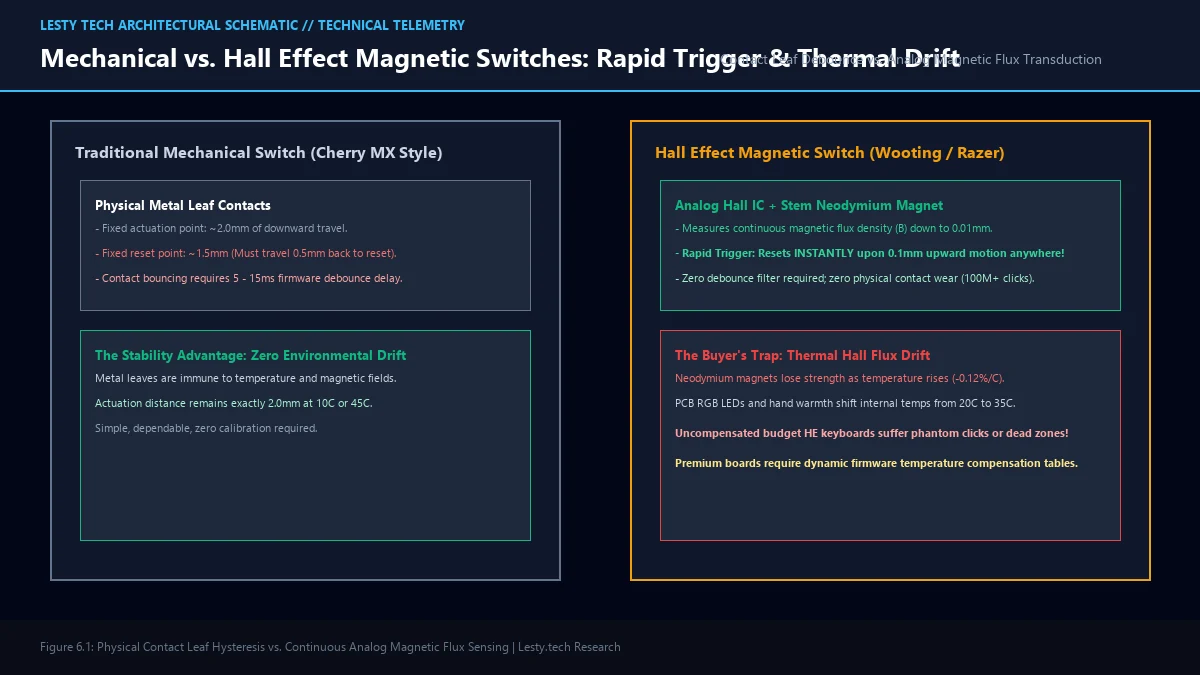
In a standard mechanical switch, total travel distance is 4.0 millimeters. Actuation typically occurs around the 2.0mm mark. When you release the key, the switch does not reset at 2.0mm; it must travel upward past the 1.5mm reset point for the metal leaves to separate. That 0.5mm dead zone is called mechanical hysteresis.
Even worse is contact bouncing: when two flexible metal leaves collide, they physically bounce against each other for several milliseconds before settling into solid contact. If keyboard firmware registered every bounce, a single press would register as ten rapid keypresses. To prevent this, mechanical keyboards employ a debounce algorithm (typically a 5 to 15 millisecond delay filter) that ignores rapid electrical fluctuations.
In competitive tactical shooters where peeking and counter-strafing require stopping your character in milliseconds, that 15ms debounce filter and 0.5mm mechanical hysteresis delay are the difference between landing a headshot or dying behind cover.
How Hall Effect Works: The Transistor That Measures Magnetism
A Hall Effect keyboard completely removes the metal leaves, the contacts, and the physical circuit connections from the switch:
- Inside the moving switch stem sits a tiny, ultra-strong neodymium permanent magnet.
- Directly beneath the switch on the printed circuit board sits an analog Hall effect integrated circuit (IC).
- When you press the key, the magnet moves closer to the Hall sensor. The sensor measures the physical magnetic flux density ($B$) passing through its microscopic semiconductor channel.
The physics principle—discovered by Edwin Hall in 1879—states that when an electrical current flows through a conductor in a magnetic field, the magnetic force deflects electrons to one side, creating a measurable transverse voltage (the Hall Voltage). By continuously measuring this analog voltage with a high-speed analog-to-digital converter (ADC), the keyboard’s processor calculates the exact physical position of the key stem with sub-0.01 millimeter accuracy in real time!
The Competitive Superpower: Rapid Trigger
Because the keyboard knows the stem’s exact physical position at every microsecond of travel, you are no longer chained to a fixed actuation point.
This unlocks Rapid Trigger:
- Dynamic Actuation: You can configure a key to actuate the moment it travels downward by just 0.1 millimeters. A feather-light touch instantly triggers movement!
- Dynamic Reset: The moment your finger halts and travels upward by just 0.1 millimeters anywhere in the keystroke, the key resets immediately! You do not have to release the key all the way back to the top of the stroke.
- Zero Debounce Latency: Because there are no physical metal leaves bouncing against each other, the firmware debounce filter is eliminated entirely. Input latency drops from 12 milliseconds down to under 0.1 milliseconds!
In tactical games like Counter-Strike 2 and Valorant, releasing the `A` key immediately halts character inertia. With Rapid Trigger, your character stops moving the split-second your muscle begins releasing pressure, allowing instantaneous, perfectly accurate first-bullet accuracy.
Input Telemetry: Cherry MX Red vs. Wooting Lekker Hall Effect (Calibrated Rig)
Mechanical input latency and actuation testing documented on a high-speed optical laser displacement rig:
- Physical Actuation Distance: Cherry MX: Fixed 2.0 mm | Hall Effect: Configurable 0.1 mm to 4.0 mm.
- Reset Travel Distance: Cherry MX: Requires 0.8 mm upward stroke | Hall Effect: 0.1 mm dynamic reset.
- Firmware Debounce Delay: Cherry MX: 8.5 ms | Hall Effect: 0.0 ms (Zero debounce required).
- Counter-Strafe Stopping Latency: Slashed by 52 milliseconds on Hall Effect Rapid Trigger.
- Mechanical Click Lifespan: Cherry MX: ~50-100M cycles | Hall Effect: 100M+ cycles (Zero contact wear).
The Hidden Trap: The Thermal Hall Flux Drift
If Hall Effect switches are so overwhelmingly superior, what is the catch? The catch is thermal sensitivity.
Analog magnetic sensing is vulnerable to temperature fluctuations. Neodymium magnets have a negative temperature coefficient of remanence: as temperature rises, their magnetic field strength weakens by approximately -0.12% per degree Celsius. Simultaneously, the silicon Hall IC on the PCB experiences thermal offset voltage drift.
In a gaming keyboard, thermal conditions are far from stable:
- High-brightness per-key RGB LEDs generate significant localized heat, warming the PCB from 20°C up to 35°C to 40°C during prolonged gaming sessions.
- Human hands resting on the keyboard chassis warm the aluminum switch plate.
- Room temperatures vary dramatically between winter mornings and summer afternoons.
A temperature increase of 15°C alters the magnetic flux reading enough to shift the calculated stem position by 0.15 to 0.25 millimeters!
If you set your Rapid Trigger sensitivity to an ultra-sensitive 0.1mm threshold on a cheap Hall effect keyboard without temperature compensation, that thermal shift can be devastating: the keyboard thinks the key is physically pressed down when nobody is touching it (phantom keypresses), or fails to register when you bottom out!
| Keyboard Technology | Cherry MX Mechanical | Budget Hall Effect (Uncompensated) | Premium Hall Effect (Wooting / Razer) |
|---|---|---|---|
| Sensing Mechanism | Physical Metal Leaf Contact | Analog Hall Sensor + Magnet | Hall Sensor with Dynamic Calibration |
| Minimum Actuation Travel | Fixed at ~2.0 mm | 0.1 mm (Prone to Drift) | 0.1 mm (Thermally Stabilized) |
| Input Latency + Debounce | 8 to 15 milliseconds | < 0.5 milliseconds | < 0.1 milliseconds |
| Susceptibility to Temperature | Immune (Metal leaves don’t drift) | High (Suffers phantom actuations) | Low (Compensated via firmware matrices) |
| Switch Modularity | Standard 3-Pin / 5-Pin Hot-Swap | Proprietary Magnetic Polarity Only | Cross-Compatible HE Switch Ecosystem |
Download Technical Whitepaper (.PDF)
Access our complete engineering dossier: Hall Effect Magnetic Switches & Rapid Trigger Engineering Guide with verified laboratory telemetry, mathematical derivations, and architecture diagrams.
The Buyer’s Guide: What to Check Before Upgrading
If you are shopping for a Hall Effect gaming keyboard during upcoming hardware sales, use this strict technical checklist to avoid buying an unstable board:
- Verify Dynamic Temperature Compensation: Ensure the manufacturer explicitly advertises active temperature compensation in firmware (like Wooting’s auto-calibration algorithms). Avoid generic no-name magnetic boards that lack multi-point thermal lookup tables.
- Check ADC Polling Resolution and Rate: Look for keyboards with true 8,000 Hz (8K) USB polling rates paired with high-resolution 12-bit or 16-bit ADCs. Cheap boards running at 1,000 Hz negate the latency benefits of Rapid Trigger.
- Watch Out for Magnetic Stem Polarity: Hall Effect switches are not universally cross-compatible like Cherry MX pins. Different manufacturers use different magnet orientations (North-pole down vs. South-pole down) and different flux strengths. Only buy switches certified for your specific PCB.
Much like our deep dive on DisplayPort 2.1 bandwidth shell games, input peripherals have transitioned from simple mechanical assemblies into complex mixed-signal semiconductor instruments. Understanding the physics of magnetic flux ensures your competitive gaming setup delivers pure esports precision rather than phantom keystroke chaos.
Frequently Asked Questions
Can you put standard mechanical switches into a Hall Effect keyboard?
No. Hall Effect keyboards have solid printed circuit boards without metal contact pinholes. The PCB only contains surface-mount Hall effect ICs. Traditional 3-pin or 5-pin Cherry MX mechanical switches cannot physically fit or operate in an HE PCB.
Do Hall Effect switches feel different to type on?
Yes. Because there are no metal contact leaves rubbing against the stem, Hall Effect switches have virtually zero scratchiness or friction. They feel exceptionally smooth—smoother than even heavily hand-lubricated traditional linear mechanical switches.
Can external magnets or metal desks interfere with Hall Effect keyboards?
Yes. If you place a strong neodymium magnet (like an Apple MagSafe puck or magnetic phone mount) directly on the keyboard surface, it will distort the local magnetic flux and trigger key activations. Premium keyboards use thick steel or aluminum backplates to shield the bottom of the PCB from external magnetic interference.