As technology continues to advance, our storage needs are constantly evolving. With the rise of digital content creation, video editing, and gaming, the demand for external hard drives has skyrocketed. But with so many options available, it can be overwhelming to choose the right one.
Understanding External Hard Drives
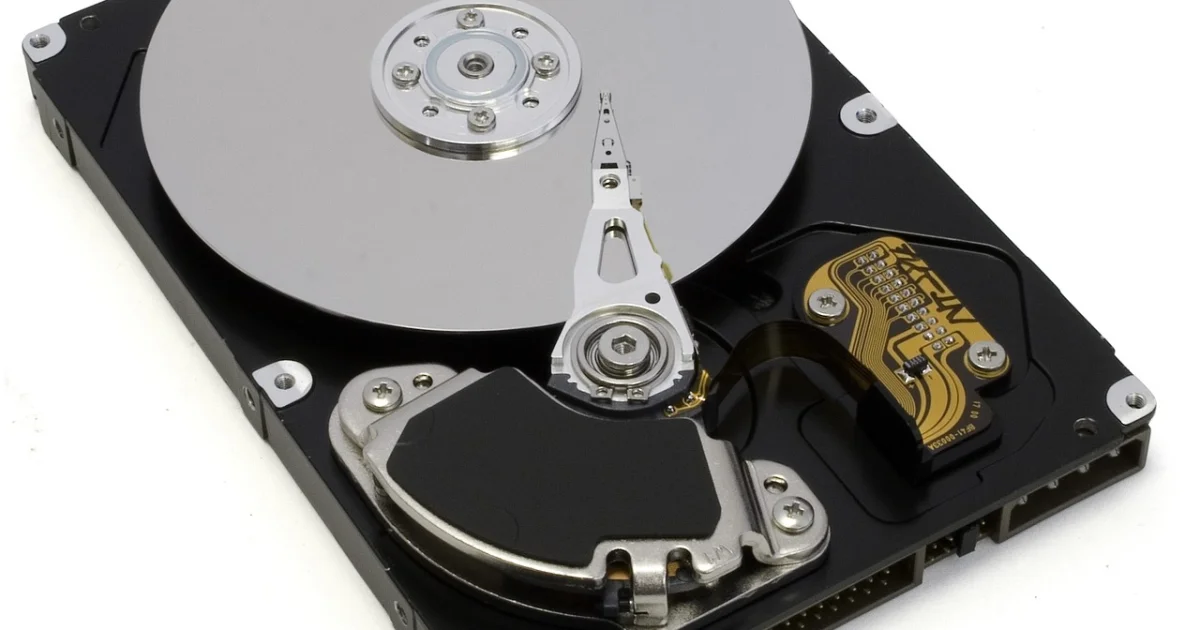
External hard drives come in two main types: solid-state drives (SSDs) and hard disk drives (HDDs). SSDs use flash memory to store data, providing faster transfer speeds and lower power consumption. HDDs, on the other hand, use spinning disks and mechanical heads to read and write data, making them more affordable but slower. When choosing an external hard drive, it’s essential to consider your specific needs and the type of computer you have.
Capacity: How Much Storage Do You Need?
External drives start at 500GB and go all the way up to 22TB or so. For a lot of people, especially if you’re looking at a faster SSD, the storage sweet spot is 1TB or 2TB. However, if you need more than that, you’ll likely be deciding between spending a lot on a 4TB SSD or opting for a more affordable but slower 4TB or 5TB mechanical drive. To determine the right capacity for you, consider the following scenarios:
Scenario 1: Student’s Digital Library
Imagine a student looking to store their entire digital library on an external hard drive. In this case, a 1TB or 2TB SSD would be an excellent choice, providing ample storage for their files and fast transfer speeds.
Scenario 2: Video File Storage
For someone who is planning to store large video files, such as 4K footage, a higher-capacity SSD or a mechanical drive with a larger storage capacity would be necessary. In this case, a 4TB or 5TB drive would provide sufficient storage for their files.
Scenario 3: Data Transfer Between Devices
Consider a user who needs to transfer data between different devices, such as between a PC and a Mac. In this case, an external drive with compatibility with both platforms would be essential, such as a USB-C drive or a Thunderbolt 5 drive.
Data Transfer Speed: Do You Need the Fastest?
Solid-state drives are delivering faster and faster data transfer speeds, with drives using Thunderbolt 5 technology delivering read/write speeds of up to 6,700MB/s and 5,300MB/s. However, these speeds come at a higher price point. Unless you regularly transfer massive video files, you probably don’t need a “pro” level storage device. Even the slowest SSDs tend to be about five times as fast as a traditional mechanical drive.
Why Speed Matters
Data transfer speed is crucial for applications that require fast file transfer, such as video editing, 3D modeling, and gaming. If you’re a content creator or gamer, a faster SSD would be an excellent choice, providing the necessary speed for your workflow.
Compatibility: Which Drive Works with Your Computer?
Most external drives are compatible with a wide variety of computers, including Macs, Windows PCs, and Chromebooks. However, things get more complicated when you get into the realm of game consoles. To store PS5 or Xbox Series X or S games, you’ll need to purchase a drive specifically for that task. You can use most external drives to store and play PS4 games or standard Xbox One games, but you’ll need to install an internal drive to store and play PS5 games.
Xbox Series X and S Expansion Cards
Xbox Series X and S machines require you to buy either the WD Black C50 expansion card or Seagate Storage expansion card to store and play Xbox Series X or S games. These expansion cards provide the necessary storage capacity and speed for gaming on these consoles.
Security: Protecting Your Sensitive Data
Some of you may be storing sensitive data on your external storage drive. If that’s the case, look for drives that include security features, including encryption. This will ensure that your data is protected from unauthorized access and theft.
Encryption and Security Features
When choosing an external hard drive, look for drives that include security features, such as encryption, password protection, and hardware-based security. These features will provide an additional layer of protection for your sensitive data.
Top Picks for 2026
Based on our research and analysis, here are top picks for external hard drives for 2026:
Best Overall: Western Digital My Passport SSD
The Western Digital My Passport SSD is a top-notch external hard drive that offers fast transfer speeds, high capacity, and excellent security features. With a 1TB capacity and read/write speeds of up to 1,050MB/s, this drive is perfect for content creators, gamers, and anyone who needs fast and reliable storage.
You may also enjoy reading: 10 Ways Google's Innovative TPUs Are Stealing the Spotlight from Nvidia.
Best Budget: Seagate Expansion 2TB External Hard Drive
The Seagate Expansion 2TB External Hard Drive is an excellent budget option that offers ample storage capacity and fast transfer speeds. With a 2TB capacity and read/write speeds of up to 160MB/s, this drive is perfect for students, home users, and anyone who needs a reliable external hard drive without breaking the bank.
Best for Gaming: WD Black P50 Game Drive SSD
The WD Black P50 Game Drive SSD is a high-performance external hard drive designed specifically for gaming. With a 2TB capacity and read/write speeds of up to 2,000MB/s, this drive is perfect for gamers who need fast and reliable storage for their games and other files.
Best for Video Editing: LaCie Rugged RAID Pro
The LaCie Rugged RAID Pro is a high-end external hard drive designed specifically for video editing and other demanding applications. With a 4TB capacity and read/write speeds of up to 2,000MB/s, this drive is perfect for professionals who need fast and reliable storage for their files.
Conclusion
Choosing the right external hard drive can be overwhelming, but by considering your specific needs and the type of computer you have, you can make an informed decision. Whether you’re a student, content creator, gamer, or professional, there’s an external hard drive out there that’s perfect for you. Remember to consider capacity, data transfer speed, compatibility, and security features when choosing your external hard drive. With the right drive, you’ll be able to store and transfer your files with ease and peace of mind.
Additional Tips and Considerations
Here are some additional tips and considerations to keep in mind when choosing an external hard drive:
Backup Your Files Regularly
It’s essential to backup your files regularly to prevent data loss in case of a hardware failure or other disaster. Consider using cloud storage services like Google Drive, Dropbox, or OneDrive to backup your files.
Choose the Right Interface
When choosing an external hard drive, consider the interface type that’s compatible with your computer. USB-C, Thunderbolt 5, and USB 3.2 Gen 2 are popular interfaces that offer fast transfer speeds.
Consider the Power Source
Some external hard drives require a power source to operate, while others are bus-powered. Consider the power requirements of your drive and whether you need to connect it to a power source.
Check the Warranty and Support
When choosing an external hard drive, consider the warranty and support offered by the manufacturer. Look for drives with a comprehensive warranty and dedicated customer support.