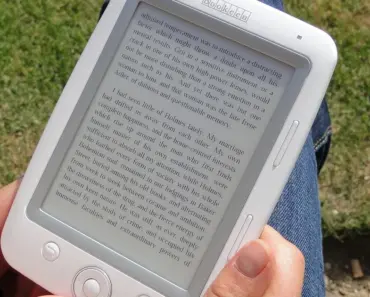
In my hunt for the best e-readers, I have been determined to find a great alternative to a Kindle or a Kobo. Don’t get me wrong — I love both of those devices and generally think they are the top choices you can buy. But I know there is a hunger for variety in the e-reader community beyond the big two. I have tried Barnes & Noble’s Nook, Remarkable e-ink tablets, and Boox e-readers, but none of them impressed me as much as the Durobo Krono. This device caught my eye at CES 2026, and after spending several weeks with it, I can say it delivers on its promises.

I have often called an e-reader a library in your pocket, but the Durobo Krono is more than that. It is a library, a bookstore, a notebook, and an MP3 player all in one. That is a lot of promise in a palm-sized device. Luckily, it totally nails it. Here is what you need to know about the Durobo Krono and why I named it the best open-source Android e-reader for anyone juggling books across multiple apps.
Durobo Krono E-Reader: Quick Verdict
If you have lots of different books on different apps — Kindle, Kobo, Audible, Libro.fm, and especially Libby — the Durobo Krono might just be for you. It runs Android 15, so the Google Play Store comes preinstalled. That means you can download your favorite reading apps directly onto the e-ink screen. The hardware is impressive: a 6.13-inch Carta 1200 e-ink display, 128GB of storage, 6GB of RAM, and a crisp 300 ppi resolution. It also has adjustable warmth and brightness, an octa-core processor, and a smart dial on the side for scrolling, refreshing, and recording voice notes. The MSRP is $279.99, which feels reasonable given the feature set.
But the real question is: how does it perform for everyday reading, especially when you switch between Kindle and Libby? Let’s break down the seven best features that make this device a game-changer for multi-platform readers.
7 Best Features for Kindle and Libby Users
1. Seamless Access to Both Kindle and Libby on One Device
The biggest pain point for anyone who reads on both Kindle and Libby is having to switch between devices. With the Durobo Krono, you can install the Kindle app and the Libby app right from the Google Play Store. I tested this by opening a borrowed library book from Libby, then flipping over to a purchased Kindle novel. The transition was smooth. The apps appear on a separate page from the Krono’s built-in library, so you do need to navigate between them. But that small step is a tiny price to pay for having your entire digital library in one place. For many readers, this alone justifies the purchase.
2. Outstanding E-Ink Display with Adjustable Warmth
The 6.13-inch Carta 1200 e-ink panel is a treat. At 300 ppi, text is razor-sharp — just as good as a Kindle Oasis or Kobo Libra. What sets the Krono apart is the adjustable warmth and brightness. You can dial in a warm amber tone for bedtime reading or a cool white for daytime. The front light is even across the screen, with no annoying shadows. During my testing, I read for two hours straight without any eye strain. This is a huge plus for Libby users who often read library books late at night. The matte finish also reduces glare, making it comfortable to read outdoors.
3. Massive 128GB Storage for Thousands of Books
Most e-readers cap storage at 8GB or 16GB. The Durobo Krono offers a whopping 128GB. That means you can store thousands of e-books, plus audiobooks and music files, without worrying about space. For Kindle users who have built up a large library over years, this is a relief. For Libby fans who borrow multiple titles at once, you can download them all and never delete anything. I loaded about 500 e-books and 30 audiobooks onto the device, and it still had over 100GB free. This is a level of storage that simply does not exist on traditional Kindles or Kobos.
4. Smart Dial for Effortless Scrolling and Navigation
One of the most innovative hardware features is the smart dial on the side of the device. It lets you scroll through pages, refresh the screen, and even start voice recording with a press. I found it especially useful when reading Libby books because I could quickly flip through chapters or adjust the font size without tapping the screen. The dial is tactile and responsive. It adds a physical interaction that feels more natural than swiping on glass. For readers who dislike constant screen touches, this is a welcome addition. The dial also works for volume control when listening to audiobooks through the built-in speaker or headphones.
5. Voice Notetaking and Durobo AI Integration
The Durobo Krono includes voice notetaking capabilities powered by Durobo AI. You can tap the smart dial and dictate a note while reading. This is great for students or researchers who need to capture thoughts without typing. The AI transcribes your speech into text that you can save and export later. I tested this by reading a Libby book on productivity and recording a quick summary. The transcription was accurate, though it stumbled on some technical terms. Still, it is a feature you will not find on a standard Kindle. It turns the e-reader into a portable study tool.
6. Audiobook and E-Book Simultaneous Use (with a Caveat)
Many readers love to listen to an audiobook while following along with the e-book. The Durobo Krono supports this through its Android multitasking. You can open Audible and the Kindle app side by side (or switch between them quickly). However, this is where performance takes a hit. When I listened to an Audible audiobook while reading a Libby e-book, the device slowed down noticeably. Pages took a second longer to turn. The solution is to use one app at a time for the best speed. Still, the capability exists, and for occasional use, it is handy. The device also works as an MP3 player, so you can load your own music files.
You may also enjoy reading: Patient Care Tech or CNA at KU Health: Requirements & Process.
7. Lightweight and Palm-Sized Design Ideal for Long Reading Sessions
The Durobo Krono weighs only 6.1 ounces and is narrower than a basic Kindle. Its 6.13-inch screen makes it perfectly palm-sized. I held it for three hours while reading a Libby thriller, and my hands never got tired. The textured back provides grip, and the bezels are thin but comfortable to hold. This form factor is a big win for people who read on the go — on the subway, in bed, or during lunch breaks. It slips easily into a jacket pocket or a small bag. Compared to an iPad or even a Kobo Libra, the Krono is far more portable.
Performance: Fast When Managed Carefully
Open Android e-readers often suffer from sluggish performance. The Boox Go and Boox Palma 2, for example, disappointed me right out of the box. The Durobo Krono, however, is brilliantly speedy — at first. In my testing, moving between different books on different apps was impressively quick. But speed is conditional. Too many apps, or more demanding apps, will slow down the device. After a week of use, I added the Substack app, which was too demanding for the Krono. Even when I was not using it, the app slowed down the whole device. Once I deleted it, the speed returned. Other demanding apps include audiobook players like Audible. I noticed this most when listening to an audiobook while reading an e-book on a separate app. It is disappointing that two reader-oriented apps can bog down an e-reader. For the best performance, use one app at a time and avoid high-demand apps like Substack or heavy web browsers.
Battery Life: A Week of Moderate Use
The battery life of the Durobo Krono is about one week with a couple of hours of use per day. That is decent for an Android e-reader, but it falls short of the month-long battery life you get from a Kindle or Kobo. If you are used to charging your Kindle every few weeks, the Krono will feel like a step back. However, compared to a smartphone or tablet, a week is still excellent. You can easily top it up overnight. The device charges via USB-C, which is convenient. If you read heavily — say, four hours daily — expect to charge every three or four days. For most people, this is manageable, but it is worth noting if battery longevity is your top priority.
More Features to Enjoy
Beyond the core reading experience, the Durobo Krono offers several extras. It has a built-in notebook function where you can take handwritten notes with a stylus (sold separately). The Durobo AI can help organize your notes. The device also functions as an MP3 player, so you can load your own music or podcasts. The smart dial can be used for voice recording, making it a handy tool for journalists or students. And because it runs Android 15, you can install any app from the Google Play Store — including note-taking apps, news readers, and even simple games. Just be mindful of performance limits with heavier apps.
Who Should Buy the Durobo Krono?
This e-reader is best for people who have books in multiple apps — Kindle, Kobo, Audible, Libro.fm, and especially Libby. It is also great for those who like to listen to audiobooks and read at the same time, and for anyone seeking an on-the-go voice notetaker. If you are deeply invested in the Apple ecosystem (Apple Books, Apple Music), you will miss those apps since this is an Android device. Similarly, if you want the absolute longest battery life, a Kindle or Kobo is still superior. But if you value flexibility, storage, and the ability to access all your digital libraries from one device, the Durobo Krono is a strong contender.
In this durobo krono review, I have highlighted seven features that make it stand out for Kindle and Libby users. From seamless app access to a massive 128GB of storage, a smart dial, voice notetaking, and a lightweight design, this device delivers where it counts. It is not perfect — performance can slow with too many apps, and battery life is shorter than competitors. But for the price of $279.99, it offers a level of versatility that no other e-reader provides. If you have been dreaming of a single device that holds your entire digital library, the Durobo Krono is that dream realized.